找到
14
篇与
Ei
相关的结果
- 第 2 页
-
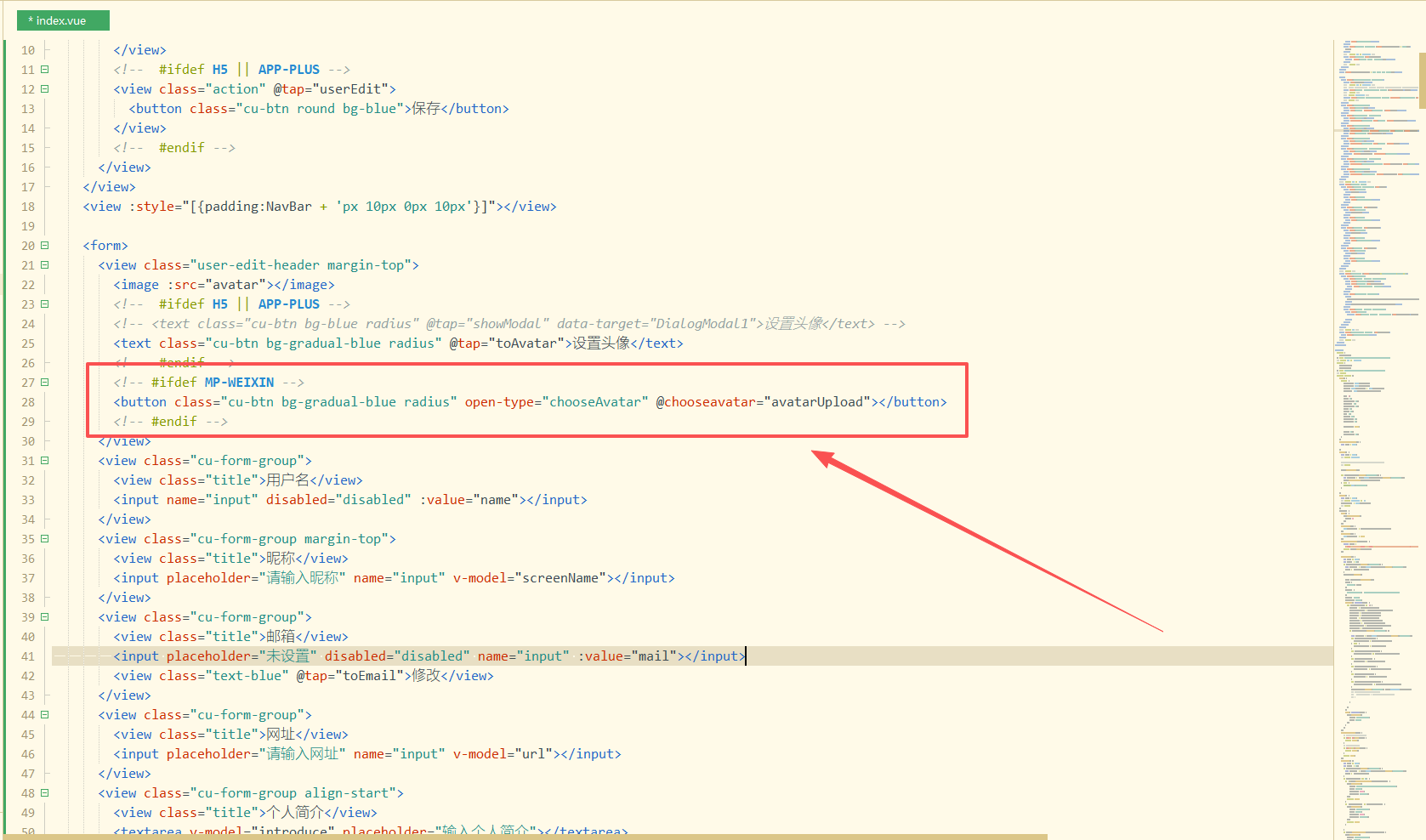
 修复RuleApp在微信环境不能设置头像问题 问题说明: 问题:RuleApp在微信内无法获取用户头像,且用户无法设置 产生原因:微信修改用户信息获取规则 修复方法: 新增微信环境设置头像按钮 <!-- #ifdef MP-WEIXIN --> <button class="cu-btn bg-gradual-blue radius" open-type="chooseAvatar" @chooseavatar="avatarUpload"></button> <!-- #endif -->修改演示图片 修改avatarUpload函数,并新增uploadAvatarToSever函数 uploadAvatarToSever(path) { const uploadTask = uni.uploadFile({ url: that.$API.upload(), filePath: path, // header: { // "Content-Type": "multipart/form-data", // }, name: 'file', formData: { 'token': token }, success: function(uploadFileRes) { setTimeout(function() { uni.hideLoading(); }, 1000); var data = JSON.parse(uploadFileRes.data); //var data = uploadFileRes.data; if (data.code == 1) { // uni.showToast({ // title: data.msg, // icon: 'none' // }) that.avatar = data.data.url; that.avatarNew = data.data.url; localStorage.removeItem('toAvatar'); that.userEdit(); //console.log(that.avatar) } else { uni.showToast({ title: "头像上传失败,请检查接口", icon: 'none' }) } }, fail: function() { setTimeout(function() { uni.hideLoading(); }, 1000); } }) }, avatarUpload(data) { var that = this; var token = ""; if (localStorage.getItem('userinfo')) { var userInfo = JSON.parse(localStorage.getItem('userinfo')); token = userInfo.token; token = userInfo.token; } // #ifdef APP-PLUS || H5 base64ToPath(data) .then(path => { that.uploadAvatarToSever(path) }) .catch(error => { console.error("失败" + error) }) // #endif // #ifdef MP-WEIXIN const path = data.detail.avatarUrl that.uploadAvatarToSever(path) // #endif },修复结果: 修复后,在微信内编辑用户信息页面会有设置头像按钮,点击按钮会调用微信官方获取头像接口,选择微信头像或者设置其他头像接口,返回用户选择的头像临时路径,使用data.detail.avatarUrl获取临时路径,调用uploadAvatarToSever函数上传到服务器。 完整代码: GitHub - RuleApp(KongHen) 原项目地址: GitHub - RuleApp(buxia97)
-
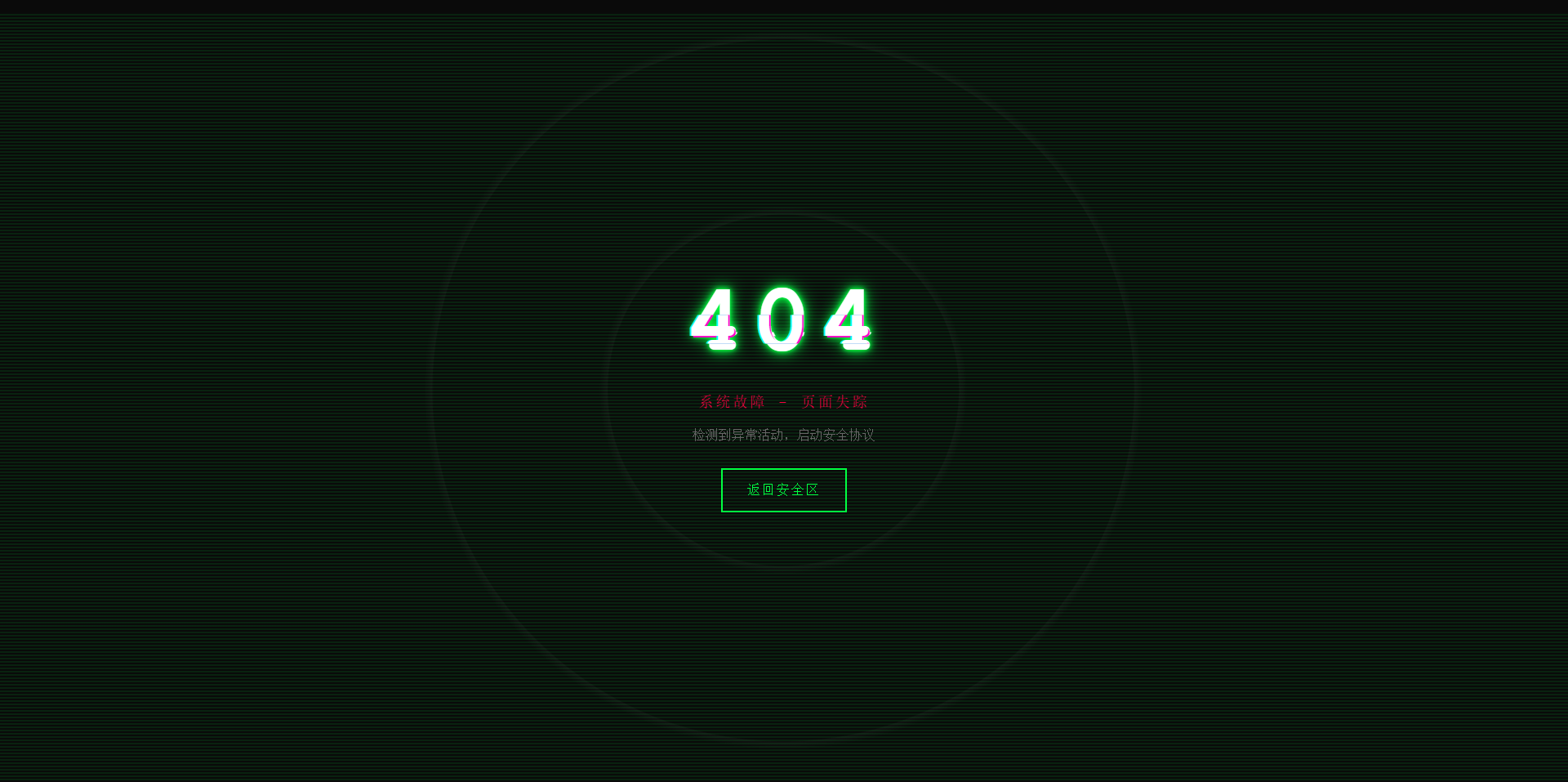
故障风格404页面 效果演示 点击查看在线演示 图片演示图片 完整代码 <!DOCTYPE html> <html lang="zh-CN"> <head> <meta charset="UTF-8"> <meta name="viewport" content="width=device-width, initial-scale=1.0"> <title>系统故障 - 404</title> <style> * { margin: 0; padding: 0; box-sizing: border-box; } body { background: #0a0a0a; font-family: 'Courier New', monospace; height: 100vh; overflow: hidden; display: flex; align-items: center; justify-content: center; color: #00ff41; cursor: crosshair; } .matrix-bg { position: absolute; width: 100%; height: 100%; opacity: 0.1; background: repeating-linear-gradient( 0deg, transparent, transparent 2px, #00ff41 2px, #00ff41 4px ); animation: scan 8s linear infinite; } @keyframes scan { 0% { transform: translateY(-100%); } 100% { transform: translateY(100%); } } .container { text-align: center; position: relative; z-index: 10; } .error-code { font-size: 120px; font-weight: bold; position: relative; display: inline-block; color: #fff; letter-spacing: 10px; animation: flicker 0.5s infinite alternate; } .error-code::before, .error-code::after { content: "404"; position: absolute; top: 0; left: 0; width: 100%; height: 100%; background: transparent; overflow: hidden; } .error-code::before { left: 2px; text-shadow: -2px 0 #ff00c8; animation: glitch-1 0.3s infinite ease-in-out alternate-reverse; clip: rect(44px, 450px, 56px, 0); } .error-code::after { left: -2px; text-shadow: -2px 0 #00ffff, 2px 2px #ff00c8; animation: glitch-2 0.3s infinite ease-in-out alternate-reverse; clip: rect(44px, 450px, 56px, 0); } @keyframes glitch-1 { 0% { clip: rect(31px, 9999px, 94px, 0); } 20% { clip: rect(112px, 9999px, 76px, 0); } 40% { clip: rect(85px, 9999px, 77px, 0); } 60% { clip: rect(62px, 9999px, 34px, 0); } 80% { clip: rect(97px, 9999px, 89px, 0); } 100% { clip: rect(53px, 9999px, 47px, 0); } } @keyframes glitch-2 { 0% { clip: rect(65px, 9999px, 119px, 0); } 20% { clip: rect(52px, 9999px, 74px, 0); } 40% { clip: rect(4px, 9999px, 78px, 0); } 60% { clip: rect(100px, 9999px, 19px, 0); } 80% { clip: rect(22px, 9999px, 98px, 0); } 100% { clip: rect(89px, 9999px, 113px, 0); } } @keyframes flicker { 0%, 19%, 21%, 23%, 25%, 54%, 56%, 100% { text-shadow: 0 0 5px #00ff41, 0 0 10px #00ff41, 0 0 20px #00ff41; } 20%, 22%, 24%, 55% { text-shadow: none; } } .error-message { font-size: 18px; color: #ff0040; margin: 20px 0; animation: pulse 2s infinite; text-transform: uppercase; letter-spacing: 3px; } @keyframes pulse { 0%, 100% { opacity: 1; } 50% { opacity: 0.3; } } .home-button { display: inline-block; padding: 15px 30px; margin-top: 30px; border: 2px solid #00ff41; background: transparent; color: #00ff41; text-decoration: none; text-transform: uppercase; letter-spacing: 2px; position: relative; overflow: hidden; transition: all 0.3s; font-family: 'Courier New', monospace; } .home-button:hover { color: #0a0a0a; box-shadow: 0 0 20px #00ff41; } .home-button::before { content: ''; position: absolute; top: 0; left: -100%; width: 100%; height: 100%; background: #00ff41; transition: left 0.3s; z-index: -1; } .home-button:hover::before { left: 0; } .noise { position: absolute; top: 0; left: 0; width: 100%; height: 100%; background: radial-gradient(circle, transparent 20%, rgba(255,255,255,0.03) 20.1%, transparent 21%), radial-gradient(circle, transparent 40%, rgba(255,255,255,0.03) 40.1%, transparent 41%); animation: noise 0.5s steps(10) infinite; pointer-events: none; } @keyframes noise { 0%, 100% { transform: translate(0); } 10% { transform: translate(-2px, -2px); } 20% { transform: translate(2px, 2px); } 30% { transform: translate(-2px, 2px); } 40% { transform: translate(2px, -2px); } 50% { transform: translate(-2px, -2px); } 60% { transform: translate(2px, 2px); } 70% { transform: translate(-2px, 2px); } 80% { transform: translate(2px, -2px); } 90% { transform: translate(-2px, -2px); } } .system-info { position: absolute; bottom: 20px; left: 20px; font-size: 12px; color: #666; font-family: monospace; animation: typewriter 3s steps(30) 1; } @keyframes typewriter { from { width: 0; } to { width: 100%; } } @media (max-width: 768px) { .error-code { font-size: 80px; } .error-message { font-size: 14px; } } </style> </head> <body> <div class="matrix-bg"></div> <div class="noise"></div> <div class="container"> <h1 class="error-code">404</h1> <p class="error-message">系统故障 - 页面失踪</p> <p style="color: #666; margin-top: 10px;">检测到异常活动,启动安全协议</p> <a href="https://www.khkj6.com" class="home-button">返回安全区</a> </div> <script> // 随机故障效果 setInterval(() => { document.body.style.filter = `hue-rotate(${Math.random() * 360}deg)`; setTimeout(() => { document.body.style.filter = 'none'; }, 100); }, 3000); // 鼠标追踪效果 document.addEventListener('mousemove', (e) => { const x = e.clientX / window.innerWidth; const y = e.clientY / window.innerHeight; const glitch = document.querySelector('.error-code'); glitch.style.transform = `translate(${x * 4}px, ${y * 4}px)`; }); </script> </body> </html>
-
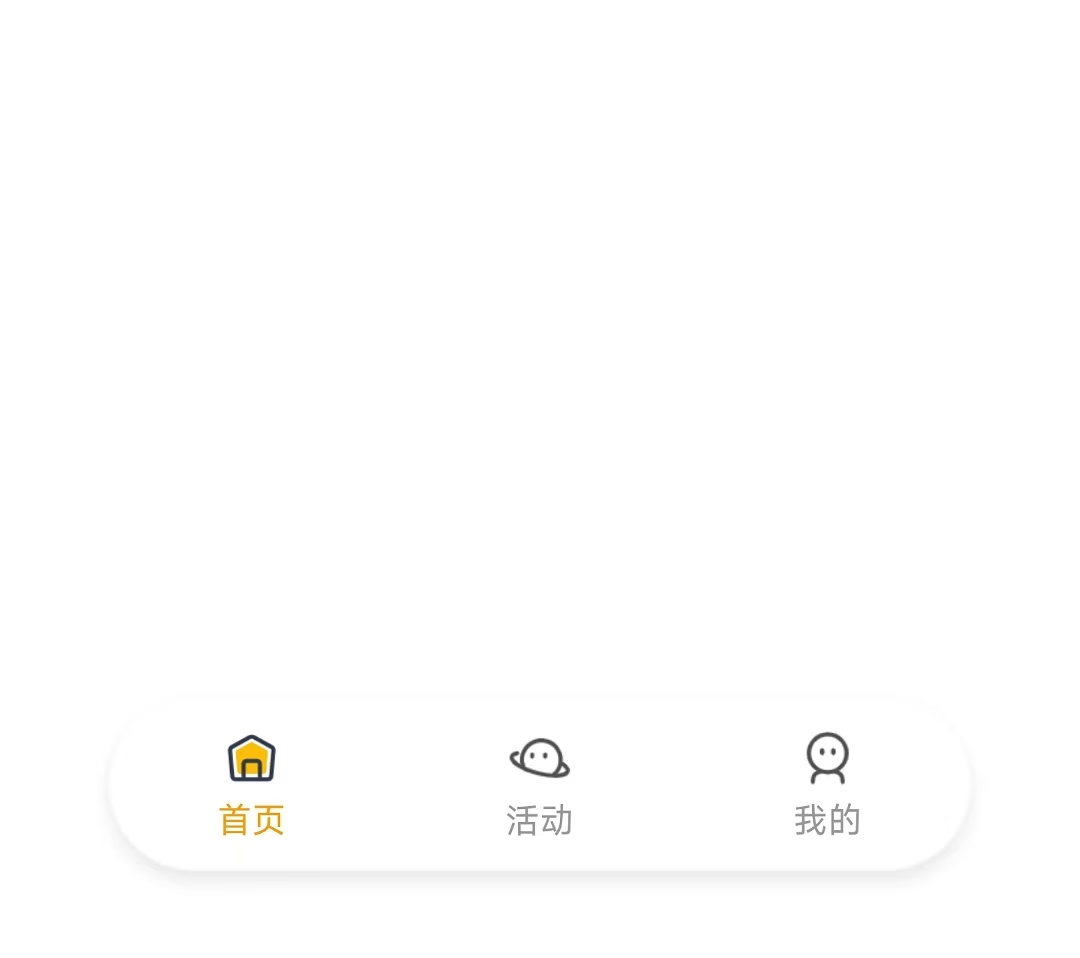
uniapp-x实现自定义tabbar uniapp-x自带导航栏位置固定,且UI无法修改。如果需要适配自己的应用UI及色彩就需要自定义tabbar。 实现说明 将tabbar写入主页面,需要显示的页面作为组件引入。 示例样式 演示示例图片 实现方法 使用swiper实现 说明: 所有页面一次性加载 允许左右滑动 优点:允许滑动切换,用户体验升级 演示代码 <template> <!-- 页面内容区域 --> <swiper style="flex: 1;" :current="selectedIndex" @change="swiperChange"> <swiper-item item-id="index"> <IndexPage></IndexPage> </swiper-item> <swiper-item item-id="more"> <MorePage></MorePage> </swiper-item> <swiper-item item-id="user"> <UserPage></UserPage> </swiper-item> </swiper> <!-- tabber区域 --> <view class="tab-bar-container"> <view v-for="(item, index) in tabList" class="tab-bar-item" @click="switchTab(index)"> <image class="tab-bar-icon" :src="(selectedIndex === index ? item.s_icon : item.icon)"></image> <text class="tab-bar-text" :style="'color:' + (selectedIndex === index ? '#F59E0B' : '#999999') +';'">{{ item.name }}</text> </view> </view> </template> <script setup lang="uts"> // 导入页面 import IndexPage from "./tabbar/index.uvue" import MorePage from "./tabbar/more.uvue" import UserPage from "./tabbar/user.uvue" // tabbar接口类型 type TabInfo = { name : string, icon : string, s_icon : string } // 页面列表 const tabList = reactive<TabInfo[]>([ { name: "首页", icon: "/static/tabbar/home.png", s_icon: "/static/tabbar/home_selected.png" }, { name: "活动", icon: "/static/tabbar/more.png", s_icon: "/static/tabbar/more_selected.png" }, { name: "我的", icon: "/static/tabbar/user.png", s_icon: "/static/tabbar/user_selected.png" } ]) // 选中的页面 const selectedIndex = ref<number>(0) // swiper切换 const swiperChange = (e: UniSwiperChangeEvent) => { let index = e.detail.current if (selectedIndex.value === index) return selectedIndex.value = index } // 页面切换 const switchTab = (index : number) => { if (selectedIndex.value === index) return selectedIndex.value = index } </script> <style lang="scss"> .tab-bar-container { position: fixed; bottom: 60rpx; width: 80%; left: 10%; z-index: 999; display: flex; flex-direction: row; justify-content: space-around; height: 120rpx; border-radius: 60rpx; box-shadow: 0 4rpx 20rpx rgba(0, 0, 0, 0.1); background: rgba(255, 255, 255, 0.4); } .tab-bar-item { display: flex; flex-direction: column; align-items: center; justify-content: center; padding: 15rpx 40rpx; } .tab-bar-icon { width: 44rpx; height: 44rpx; margin-bottom: 8rpx; } .tab-bar-text { font-size: 24rpx; } </style>官方示例 说明: 单次只加载一个页面 加载成功后使用v-show控制显示/隐藏,不重复加载(官方使用CSS属性visibility控制,测试不行) 优点:分页加载,减小单次加载压力(如果页面DOM多的话) 演示代码 <template> <!-- 页面内容区域 --> <view style="flex: 1;"> <IndexPage v-if="tabList[0].init" v-show="selectedIndex==0"></IndexPage> <MorePage v-if="tabList[1].init" v-show="selectedIndex==1"></MorePage> <MorePage v-if="tabList[2].init" v-show="selectedIndex==2"></MorePage> </view> <!-- tabber区域 --> <view class="tab-bar-container"> <view v-for="(item, index) in tabList" class="tab-bar-item" @click="switchTab(index)"> <image class="tab-bar-icon" :src="(selectedIndex === index ? item.s_icon : item.icon)"></image> <text class="tab-bar-text" :style="'color:' + (selectedIndex === index ? '#F59E0B' : '#999999') +';'">{{ item.name }}</text> </view> </view> </template> <script setup lang="uts"> // 导入页面 import IndexPage from "./tabbar/index.uvue" import MorePage from "./tabbar/more.uvue" import UserPage from "./tabbar/user.uvue" // tabbar接口类型 type TabInfo = { init: boolean, name : string, icon : string, s_icon : string } // 页面列表 const tabList = reactive<TabInfo[]>([ { init: true, name: "首页", icon: "/static/tabbar/home.png", s_icon: "/static/tabbar/home_selected.png" }, { init: false, name: "更多", icon: "/static/tabbar/more.png", s_icon: "/static/tabbar/more_selected.png" }, { init: false, name: "我的", icon: "/static/tabbar/user.png", s_icon: "/static/tabbar/user_selected.png" } ]) // 选中的页面 const selectedIndex = ref<number>(0) // 页面切换 const switchTab = (index : number) => { if (selectedIndex.value === index) return if (!tabList[index].init) { tabList[index].init = true } selectedIndex.value = index } </script> <style lang="scss"> .tab-bar-container { position: fixed; bottom: 60rpx; width: 80%; left: 10%; z-index: 999; display: flex; flex-direction: row; justify-content: space-around; height: 120rpx; border-radius: 60rpx; box-shadow: 0 4rpx 20rpx rgba(0, 0, 0, 0.1); background: rgba(255, 255, 255, 0.4); } .tab-bar-item { display: flex; flex-direction: column; align-items: center; justify-content: center; padding: 15rpx 40rpx; } .tab-bar-icon { width: 44rpx; height: 44rpx; margin-bottom: 8rpx; } .tab-bar-text { font-size: 24rpx; } </style>其他方法 使用share-element组件实现 复制官方代码,偶先切换页面组件闪动问题。官方uniapp-xapp的demo测试正常,不知道申明原因。 使用components组件+share-element组件实现的tabbar组件实现,tabbar组件会出现与页面移入方向反向滑动的动画 share-element文档 静态资源 tabbar图标(png) 下载地址:https://www.khkj6.com/usr/uploads/2025/08/2337268233.zip 提取码:
-
光年模板(V5)侧边栏菜单js修改 主要修改了初始化JSON结构,使菜单层级更清晰。 修改后的代码 // 侧边栏列表 var menu_list = [ { "name": "首页", "url": ["/", "/index/index"], "icon": "mdi mdi-home-variant-outline", "is_out": 0 }, { "name": "链接管理", "url": ["#!"], "icon": "mdi mdi-cookie-outline", "is_out": 0, "children": [ { "name": "链接列表", "url": ["/link/list", "/link/data"], "is_out": 0 }, { "name": "创建链接", "url": ["/link/create", "/link/edit"], "is_out": 0 } ] }, { "name": "财务管理", "url": ["#!"], "icon": "mdi mdi-credit-card-chip-outline", "is_out": 0, "children": [ { "name": "余额充值", "url": ["/finance/recharge"], "is_out": 0 }, { "name": "账单列表", "url": ["/finance/bills"], "is_out": 0 } ] }, { "name": "用户管理", "url": ["/user/list"], "icon": "mdi mdi-account-outline", "is_out": 0, }, { "name": "系统设置", "url": ["#!"], "icon": ["mdi mdi-cog-outline"], "is_out": 0, "children": [ { "name": "个人资料", "url": ["/system/user"], "is_out": 0, }, { "name": "操作日志", "url": ["/system/logs"], "is_out": 0, "children": [ { "name": "账单日志", "url": ["/system/logs/bills"], "is_out": 0, }, { "name": "登录日志", "url": ["/system/logs/login"], "is_out": 0, }, { "name": "链接日志", "url": ["/system/logs/link"], "is_out": 0, } ] } ] }, { "name": "退出登录", "url": ["/user/logout"], "icon": "mdi mdi-location-exit", "is_out": 0 } ]; setSidebar(menu_list); /** * 菜单 * @param data 菜单JSON数据 * name 菜单名称 string * url 菜单链接地址 array 首个为跳转地址。当路由为其中一个时,激活当前菜单选中状态。 * icon 图标 * is_out 是否外链0否|1是 int 外链a标签没有class='multitabs' * children 子菜单 array */ function setSidebar(data) { if (data.length == 0) return false; processMenu(data); console.log(data); html = createMenu(data, true); $('.sidebar-main').append(html); } // 创建html数据 function createMenu(data, is_frist) { var menu_body = is_frist ? '<ul class="nav-drawer">' : '<ul class="nav nav-subnav">'; for (var i = 0; i < data.length; i++) { iframe_class = data[i].is_out == 1 ? 'target="_blank"' : 'class="multitabs"'; icon_div = data[i].is_root == 1 ? '<i class="' + data[i].icon + '"></i>' : ''; menuName = data[i].is_root == 1 ? '<span>' + data[i].name + '</span>' : data[i].name; if (data[i].children && data[i].children.length > 0) { selected = data[i].is_active == 1 ? 'active open' : ''; menu_body += '<li class="nav-item nav-item-has-subnav ' + selected + '"><a href="javascript:void(0)">' + icon_div + menuName + '</a>'; menu_body += createMenu(data[i].children); } else { selected = data[i].is_active == 1 ? 'active' : ''; menu_body += '<li class="nav-item ' + selected + '"><a href="' + data[i].url[0] + '" ' + iframe_class + '>' + icon_div + menuName + '</a>'; } menu_body += '</li>'; } menu_body += '</ul>'; return menu_body; }; // 添加 is_active 和 is_root 属性到所有层级 function addProperties(menu) { menu.forEach(item => { item.is_active = 0; item.is_root = 0; if (item.children && item.children.length > 0) { addProperties(item.children); } }); } // 标记激活状态和父级路径 function markActivePath(menu, currentPath, parentChain = []) { for (let i = 0; i < menu.length; i++) { const item = menu[i]; const newParentChain = [...parentChain, item]; // 检查当前路径是否匹配 const isMatch = item.url.some(url => url === currentPath); if (isMatch) { // 标记当前节点为激活 item.is_active = 1; // 标记整个父链为激活 newParentChain.forEach(node => { node.is_active = 1; node.is_root = 1; }); return true; // 找到匹配路径 } // 递归检查子节点 if (item.children && item.children.length > 0) { const foundInChildren = markActivePath(item.children, currentPath, newParentChain); if (foundInChildren) { // 标记当前节点为激活(因为子节点已激活) item.is_active = 1; item.is_root = 1; return true; } } } return false; // 当前分支未找到匹配 } // 主处理函数 function processMenu(menu) { // 1. 添加初始属性 addProperties(menu); // 2. 标记第一层级为根节点 menu.forEach(item => { item.is_root = 1; }); // 3. 获取当前页面路径 const currentPath = window.location.pathname; // 4. 标记激活路径 markActivePath(menu, currentPath); }光年模板原代码 var menu_list = [ { "id": "1", "name": "后台首页", "url": "lyear_main_1_v5.html", "pid": 0, "icon": "mdi mdi-home", "is_out": 0, "is_home": 1 }, { "id": "2", "name": "布局示例", "url": "#!", "pid": 0, "icon": "mdi mdi-palette", "is_out": 0, "is_home": 0 }, { "id": "3", "name": "表单布局示例", "url": "lyear_layout_form.html", "pid": 2, "icon": "", "is_out": 0, "is_home": 0 }, { "id": "4", "name": "聊天页面示例", "url": "lyear_layout_chat.html", "pid": 2, "icon": "", "is_out": 0, "is_home": 0 }, { "id": "5", "name": "logo处使用文字", "url": "lyear_layout_logo_text.html", "pid": 2, "icon": "", "is_out": 1, "is_home": 0 }, { "id": "6", "name": "多级菜单", "url": "#!", "pid": 0, "icon": "mdi mdi-menu", "is_out": 0, "is_home": 0 }, { "id": "7", "name": "一级菜单", "url": "#!", "pid": 6, "icon": "", "is_out": 0, "is_home": 0 }, { "id": "8", "name": "一级菜单", "url": "#!", "pid": 6, "icon": "", "is_out": 0, "is_home": 0 }, { "id": "9", "name": "二级菜单", "url": "#!", "pid": 8, "icon": "", "is_out": 0, "is_home": 0 }, { "id": "10", "name": "二级菜单", "url": "#!", "pid": 8, "icon": "", "is_out": 0, "is_home": 0 }, { "id": "11", "name": "三级菜单", "url": "#!", "pid": 10, "icon": "", "is_out": 0, "is_home": 0 }, { "id": "12", "name": "三级菜单", "url": "#!", "pid": 10, "icon": "", "is_out": 0, "is_home": 0 } ]; setSidebar(menu_list); /** * 菜单 * @param data 菜单JSON数据 * id 菜单唯一ID * name 菜单名称 * url 菜单链接地址 * icon 图标 * pid 父级ID * is_out 是否外链0否|1是,外链a标签没有class='multitabs' * is_home 是否首页 */ function setSidebar(data){ if (data.length == 0) return false; var treeObj = getTrees(data, 0, 'id', 'pid', 'children'); html = createMenu(treeObj, true); $('.sidebar-main').append(html); } function createMenu(data, is_frist) { var menu_body = is_frist ? '<ul class="nav-drawer">' : '<ul class="nav nav-subnav">'; for(var i = 0; i < data.length; i++){ iframe_class = data[i].is_out == 1 ? 'target="_blank"' : 'class="multitabs"'; icon_div = data[i].pid == 0 ? '<i class="' + data[i].icon + '"></i>' : ''; selected = (data[i].pid == 0) && (data[i].is_home == 1) ? 'active' : ''; menuName = data[i].pid == 0 ? '<span>' + data[i].name + '</span>' : data[i].name; homeIdName = (data[i].pid == 0) && (data[i].is_home == 1) ? 'id="default-page"' : ''; if (data[i].children && data[i].children.length > 0) { menu_body += '<li class="nav-item nav-item-has-subnav"><a href="javascript:void(0)">' + icon_div + menuName + '</a>'; menu_body += createMenu(data[i].children); } else { menu_body += '<li class="nav-item ' + selected + '"><a href="' + data[i].url + '" '+ iframe_class + homeIdName + '>' + icon_div + menuName + '</a>'; } menu_body += '</li>'; } menu_body += '</ul>'; return menu_body; }; /** * 树状的算法 * @params list 代转化数组 * @params parentId 起始节点 * @params idName 主键ID名 * @params parentIdName 父级ID名称 * @params childrenName 子级名称 * @author CSDN博主「伤包子」 */ function getTrees(list, parentId, idName, parentIdName, childrenName) { let items= {}; // 获取每个节点的直属子节点,*记住是直属,不是所有子节点 for (let i = 0; i < list.length; i++) { let key = list[i][parentIdName]; if (items[key]) { items[key].push(list[i]); } else { items[key] = []; items[key].push(list[i]); } } return formatTree(items, parentId, idName, childrenName); } /** * 利用递归格式化每个节点 */ function formatTree(items, parentId, idName, childrenName) { let result = []; if (!items[parentId]) { return result; } for (let t in items[parentId]) { items[parentId][t][childrenName] = formatTree(items, items[parentId][t][idName], idName, childrenName) result.push(items[parentId][t]); } return result; }参考文献 侧边栏菜单的JS初始化 - 光年模板(V5)
-
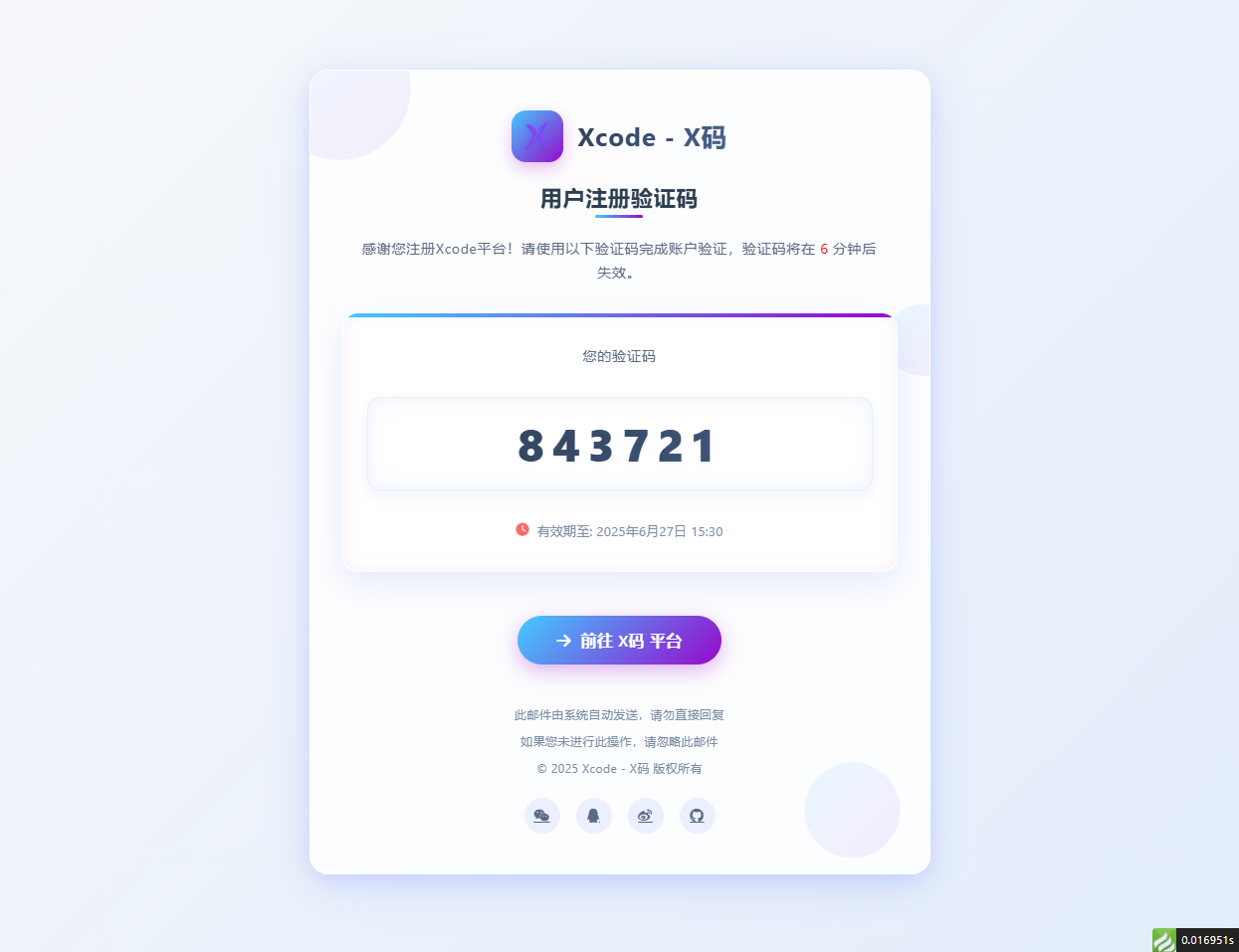
邮箱验证码html模板 适配大屏和小屏 问题:fa图标在邮件中不显示,请自行替换成图片 演示图片 大屏演示图片 代码 <!DOCTYPE html> <html lang="zh-CN"> <head> <meta charset="UTF-8"> <meta name="viewport" content="width=device-width, initial-scale=1.0"> <title>用户注册 - Xcode验证码</title> <link rel="stylesheet" href="https://cdnjs.cloudflare.com/ajax/libs/font-awesome/6.4.0/css/all.min.css"> <style> /* 基础样式重置 */ * { margin: 0; padding: 0; box-sizing: border-box; font-family: 'Segoe UI', 'PingFang SC', 'Microsoft YaHei', sans-serif; } body { background: linear-gradient(135deg, #f5f7fa 0%, #e4edfb 100%); min-height: 100vh; display: flex; justify-content: center; align-items: center; padding: 30px; letter-spacing: 0.5px; } /* 亮色毛玻璃效果容器 */ .glass-container { background: rgba(255, 255, 255, 0.85); backdrop-filter: blur(12px); -webkit-backdrop-filter: blur(12px); border-radius: 24px; border: 1px solid rgba(255, 255, 255, 0.8); box-shadow: 0 12px 40px rgba(98, 131, 252, 0.15), 0 4px 20px rgba(98, 131, 252, 0.08); width: 100%; max-width: 780px; overflow: hidden; padding: 50px 40px; position: relative; transition: all 0.4s ease; } .glass-container:hover { box-shadow: 0 15px 50px rgba(98, 131, 252, 0.2), 0 6px 25px rgba(98, 131, 252, 0.12); transform: translateY(-5px); } /* 装饰元素 */ .decoration { position: absolute; border-radius: 50%; background: linear-gradient(135deg, rgba(67, 203, 255, 0.15) 0%, rgba(151, 8, 204, 0.1) 100%); z-index: -1; opacity: 0.7; } .decoration-1 { width: 180px; height: 180px; top: -60px; left: -60px; animation: float 8s infinite ease-in-out; } .decoration-2 { width: 120px; height: 120px; bottom: 30px; right: 30px; animation: float 10s infinite ease-in-out; animation-delay: 1s; } .decoration-3 { width: 90px; height: 90px; top: 30%; right: -30px; animation: float 12s infinite ease-in-out; animation-delay: 2s; } @keyframes float { 0%, 100% { transform: translate(0, 0); } 25% { transform: translate(-10px, 15px); } 50% { transform: translate(5px, -10px); } 75% { transform: translate(10px, 5px); } } /* 头部样式 */ .header { text-align: center; margin-bottom: 40px; position: relative; } .logo { display: flex; justify-content: center; align-items: center; margin-bottom: 25px; } .logo-icon { width: 65px; height: 65px; background: linear-gradient(135deg, #43CBFF 0%, #9708CC 100%); border-radius: 18px; display: flex; justify-content: center; align-items: center; margin-right: 18px; box-shadow: 0 8px 20px rgba(151, 8, 204, 0.25); transition: all 0.3s ease; } .logo-icon:hover { transform: rotate(10deg) scale(1.05); } .logo-icon img { margin: 20%; width: 60%; height: 60%; filter: drop-shadow(0 2px 4px rgba(0, 0, 0, 0.1)); } .logo-text { font-size: 32px; font-weight: 700; background: linear-gradient(135deg, #2c3e50 0%, #4a6491 100%); -webkit-background-clip: text; background-clip: text; color: transparent; letter-spacing: 1.2px; } .title { font-size: 28px; font-weight: 700; color: #2c3e50; margin-bottom: 30px; position: relative; display: inline-block; } .title::after { content: ""; position: absolute; bottom: -8px; left: 50%; transform: translateX(-50%); width: 60px; height: 4px; background: linear-gradient(135deg, #43CBFF 0%, #9708CC 100%); border-radius: 2px; } .subtitle { font-size: 18px; color: #5a6a85; line-height: 1.7; margin: 0 auto; /* max-width: 600px; */ padding: 0 20px; } /* 验证码区域 - 亮色系突出 */ .verification-section { background: rgba(255, 255, 255, 0.95); border-radius: 20px; padding: 40px 30px; margin: 40px 0; text-align: center; backdrop-filter: blur(5px); -webkit-backdrop-filter: blur(5px); border: 1px solid rgba(255, 255, 255, 0.9); box-shadow: 0 10px 30px rgba(98, 131, 252, 0.1), inset 0 0 15px rgba(151, 8, 204, 0.05); position: relative; overflow: hidden; transition: all 0.3s ease; } .verification-section::before { content: ""; position: absolute; top: 0; left: 0; right: 0; height: 5px; background: linear-gradient(135deg, #43CBFF 0%, #9708CC 100%); } .verification-section:hover { transform: translateY(-5px); box-shadow: 0 15px 40px rgba(98, 131, 252, 0.15), inset 0 0 20px rgba(151, 8, 204, 0.08); } .verification-label { font-size: 18px; color: #5a6a85; margin-bottom: 20px; font-weight: 500; } .verification-code { width: 100%; font-size: 56px; font-weight: 800; letter-spacing: 10px; background: linear-gradient(135deg, #2c3e50 0%, #4a6491 100%); -webkit-background-clip: text; background-clip: text; color: transparent; padding: 20px 40px; border-radius: 16px; margin: 20px 0; display: inline-block; box-shadow: inset 0 0 25px rgba(98, 131, 252, 0.1), 0 8px 20px rgba(98, 131, 252, 0.1); border: 1px solid rgba(98, 131, 252, 0.15); text-shadow: 0 2px 4px rgba(0, 0, 0, 0.05); transition: all 0.3s ease; } .verification-code:hover { letter-spacing: 12px; box-shadow: inset 0 0 30px rgba(98, 131, 252, 0.15), 0 10px 25px rgba(98, 131, 252, 0.15); } .expiration { font-size: 16px; color: #7a8ca5; margin-top: 20px; display: flex; align-items: center; justify-content: center; gap: 10px; } .expiration i { color: #ff6b6b; } /* 操作区域 */ .action-section { text-align: center; margin-top: 50px; } .action-button { background: linear-gradient(135deg, #43CBFF 0%, #9708CC 100%); color: white; border: none; padding: 18px 50px; font-size: 20px; font-weight: 600; border-radius: 60px; cursor: pointer; transition: all 0.3s ease; box-shadow: 0 8px 25px rgba(151, 8, 204, 0.3); text-decoration: none; display: inline-flex; align-items: center; gap: 12px; position: relative; overflow: hidden; } .action-button::before { content: ""; position: absolute; top: 0; left: -100%; width: 100%; height: 100%; background: linear-gradient(90deg, transparent, rgba(255, 255, 255, 0.3), transparent); transition: 0.5s; } .action-button:hover::before { left: 100%; } .action-button:hover { transform: translateY(-5px) scale(1.05); box-shadow: 0 12px 35px rgba(151, 8, 204, 0.4); } .action-button:active { transform: translateY(0) scale(0.98); } .copyright-link { color: #7a8ca5; text-decoration: none; transition: all 0.3s ease; } .copyright-link:hover { color: #9708CC; text-decoration: underline; } /* 底部信息 */ .footer { text-align: center; margin-top: 50px; color: #7a8ca5; font-size: 15px; line-height: 1.7; } .footer p { margin-bottom: 8px; } .social-icons { display: flex; justify-content: center; gap: 20px; margin-top: 25px; } .social-icons a { width: 45px; height: 45px; border-radius: 50%; background: rgba(98, 131, 252, 0.1); display: flex; align-items: center; justify-content: center; color: #5a6a85; font-size: 18px; transition: all 0.3s ease; } .social-icons a:hover { background: linear-gradient(135deg, #43CBFF 0%, #9708CC 100%); color: white; transform: translateY(-5px); } /* 响应式设计 */ @media (max-width: 768px) { .glass-container { padding: 40px 30px; max-width: 100%; } .logo-icon { width: 55px; height: 55px; } .logo-text { font-size: 28px; } .title { font-size: 24px; } .subtitle { font-size: 16px; } .verification-section { padding: 30px 20px; } .verification-code { font-size: 42px; padding: 15px 30px; letter-spacing: 8px; } .action-button { padding: 16px 40px; font-size: 18px; } } @media (max-width: 480px) { .glass-container { padding: 30px 20px; } .logo { flex-direction: column; gap: 15px; } .logo-icon { margin-right: 0; } .logo-text { font-size: 26px; } .title { font-size: 22px; } .verification-section { padding: 25px 15px; } .verification-code { font-size: 36px; padding: 12px 20px; letter-spacing: 6px; } .action-button { padding: 14px 35px; font-size: 16px; } } </style> </head> <body> <div class="glass-container"> <!-- 装饰元素 --> <div class="decoration decoration-1"></div> <div class="decoration decoration-2"></div> <div class="decoration decoration-3"></div> <div class="header"> <div class="logo"> <div class="logo-icon"> <img src="http://xma.dev.khkj.xyz/static/images/logo.png" alt="Xcode Logo"> </div> <div class="logo-text">Xcode - X码</div> </div> <h1 class="title">用户注册验证码</h1> <p class="subtitle">感谢您注册Xcode平台!请使用以下验证码完成账户验证,验证码将在 <text style="color:red;">6</text> 分钟后失效。</p> </div> <div class="verification-section"> <div class="verification-label">您的验证码</div> <div class="verification-code">843721</div> <div class="expiration"> <i class="fas fa-clock"></i>有效期至: 2025年6月27日 15:30 </div> </div> <div class="action-section"> <a href="https://xma.run" class="action-button"> <i class="fas fa-arrow-right"></i>前往 X码 平台 </a> </div> <div class="footer"> <p>此邮件由系统自动发送,请勿直接回复</p> <p>如果您未进行此操作,请忽略此邮件</p> <p>© 2025 <a href="https://xma.run" class="copyright-link">Xcode - X码</a> 版权所有</p> <div class="social-icons"> <a href="#"><i class="fab fa-weixin"></i></a> <a href="#"><i class="fab fa-qq"></i></a> <a href="#"><i class="fab fa-weibo"></i></a> <a href="#"><i class="fab fa-github"></i></a> </div> </div> </div> <script> // 添加简单的交互效果 document.addEventListener('DOMContentLoaded', function() { const verificationCode = document.querySelector('.verification-code'); // 添加点击复制功能 verificationCode.addEventListener('click', function() { const text = this.innerText; const tempInput = document.createElement('input'); tempInput.value = text; document.body.appendChild(tempInput); tempInput.select(); document.execCommand('copy'); document.body.removeChild(tempInput); alert("复制成功"); }); }); </script> </body> </html>