找到
3
篇与
ga
相关的结果
-
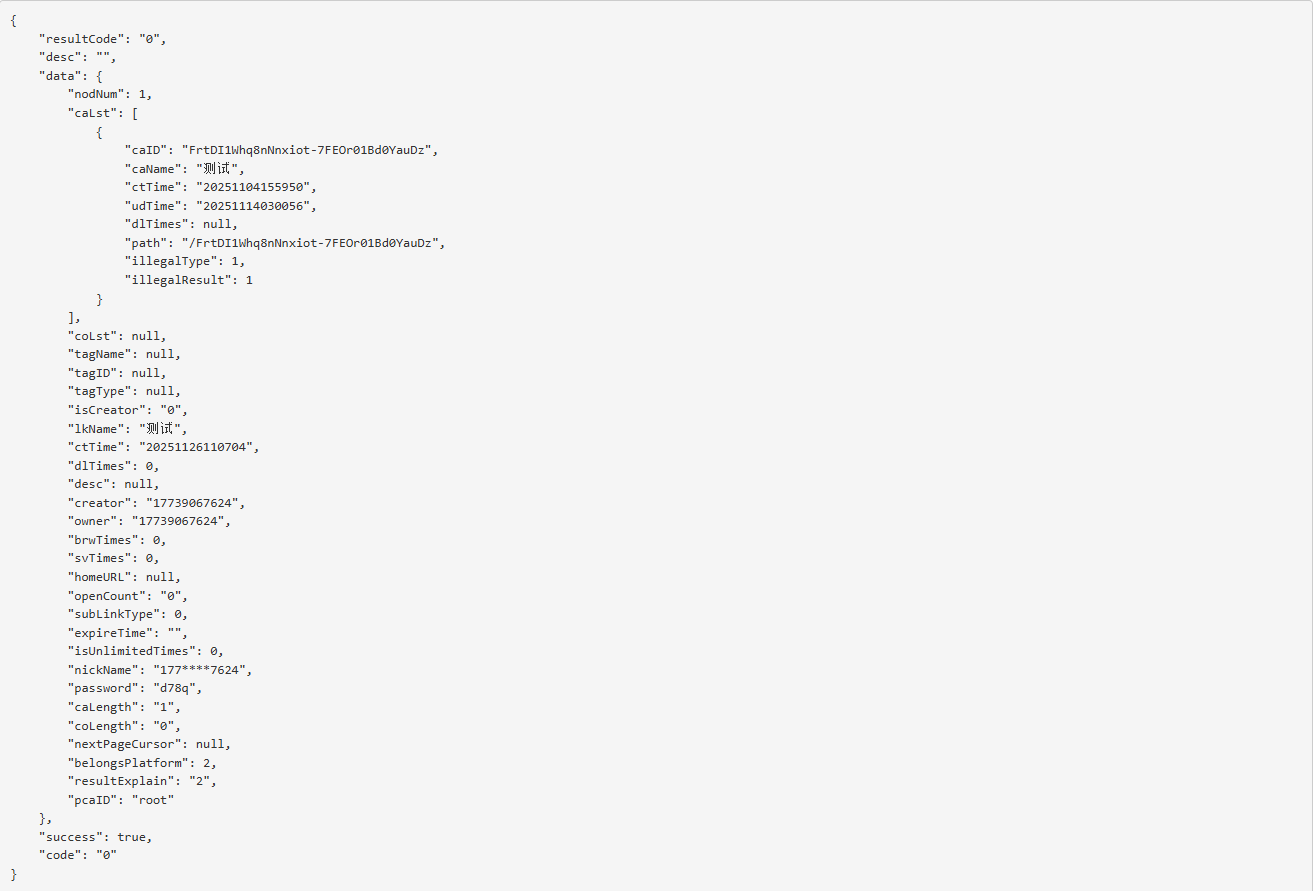
 移动云盘分享的链接信息获取接口请求体/响应体加密及解密 实现目的 有没有过这样的体验?手里攥着几十上百个网盘分享链接,要一个个点进页面、手动确认转存到自己的网盘——重复的操作像流水线作业,不仅浪费时间,而且还可能会漏掉文件。所以搞个自动转存脚本是非常有必要的。 打开分享链接->点击F12->查看网络,$[阿鲁表情]::(哭泣) 网盘的分享链接数据居然全是加密的。观察了一下加密字符好像是base64,直接一手解码,乱码!!!作为一个对逆向工程一窍不通的开发者,这已经超出了我的能力范围。 既然自己搞不定,不如试试“AI”。刚好试试最近热门的Gork.我把收集到的几条请求体、响应体密文整理好,清晰标注了获取场景,然后一股脑发给了Gork。 让我惊喜的是,Gork不仅精准识别出这些密文来自哪个网盘站点,还直接给出了对应的加密算法类型。我拿着密钥代入算法解密,结果发现解密失败$[阿鲁表情]::(中指)。 我只能继续问Gork,让它提供判断加密算法和密钥的参考来源。好在Gork很配合,直接给出了几个链接,包含GitHub及CSDN的链接。将几个站点都查看了一遍,选择了最简单的,文件名清晰且代码精简。 经过测试,解密可以使用,但是加密报错。将问题再扔给Gork,修复了即便终于给了我可以使用的代码,自己再整合一下就完成了转存分享中最难的部分$[阿鲁表情]::(得意)。 演示链接 链接: https://yun.139.com/shareweb/#/w/i/2qidG1XEkUKi0 提取码:d78q 复制内容打开中国移动云盘手机APP,操作更方便哦 解密解密分析 项目说明算法AES-128-CBC + PKCS7 填充密钥"PVGDwmcvfs1uV3d1"(UTF-8 编码)IV随机,前 16 字节拼接在密文前密文Base64 解码后第 17 字节起编码整体 Base64(标准,无 URL-safe)加解密代码 需要安装crypto-js库 const CryptoJS = require("crypto-js"); // 新版外链接口固定密钥 const FIXED_KEY = "PVGDwmcvfs1uV3d1"; /** * 移动云盘新版外链加密(OutLink) * @param {string} plaintextJson 明文JSON字符串 * @returns {string} 最终的Base64密文(和官方App一模一样) */ function encryptOutLink(plaintextJson) { // 1. 生成随机IV(16字节) const iv = CryptoJS.lib.WordArray.random(16); // 2. AES-128-CBC 加密 const encrypted = CryptoJS.AES.encrypt( plaintextJson, CryptoJS.enc.Utf8.parse(FIXED_KEY), { iv: iv, mode: CryptoJS.mode.CBC, padding: CryptoJS.pad.Pkcs7 } ); // 3. 把 IV(16字节) + 密文 拼接起来 const ivAndCiphertext = iv.concat(encrypted.ciphertext); // 4. 整体转Base64 → 这就是最终发出去的字符串 return ivAndCiphertext.toString(CryptoJS.enc.Base64); } /** * 解密移动云盘新版外链(OutLink) * @param {string} encryptedBase64 响应体的 Base64 字符串(可能带空格) * @returns {string} 解密后的明文 JSON */ function decryptOutLink(encryptedBase64) { try { // 1. 清理 Base64 const cleanB64 = encryptedBase64.replace(/\s+/g, '');; // 2. Base64 解码 → WordArray const combined = CryptoJS.enc.Base64.parse(cleanB64); const totalLength = combined.sigBytes; // 总字节数 // 3. 提取 IV(前 16 字节 = 4 words)和密文(剩余) const ivBytes = combined.sigBytes / 4; // 每个 word 4 字节 const iv = CryptoJS.lib.WordArray.create(combined.words.slice(0, 4)); // 前 16 字节 const ciphertext = CryptoJS.lib.WordArray.create( combined.words.slice(4), totalLength - 16 // 剩余长度 ); // 4. AES-128-CBC 解密 const decrypted = CryptoJS.AES.decrypt( { ciphertext: ciphertext }, CryptoJS.enc.Utf8.parse(FIXED_KEY), { iv: iv, mode: CryptoJS.mode.CBC, padding: CryptoJS.pad.Pkcs7 } ); // 5. 转 UTF-8 字符串(JSON) const plaintext = decrypted.toString(CryptoJS.enc.Utf8); if (!plaintext) { throw new Error("解密为空,可能是填充错误或密钥不对"); } return plaintext; } catch (error) { throw new Error(`解密失败: ${error.message}`); } } // 测试 // getOutLinkGeneral 请求体加密 const test1 = JSON.stringify({ getOutLinkGeneralReq: { linkID: "2qidFfUiXYAas", isPasswd: 1 } }); const res1 = encryptOutLink(test1); console.log("getOutLinkGeneral 请求体加密结果:", res1); console.log("getOutLinkGeneral 请求体解密结果:", decryptOutLink(res1)); // getOutLinkInfoV6 请求体加密 const test2 = JSON.stringify({ getOutLinkInfoReq: { account: "", linkID: "2qidG1XEkUKi0", passwd: "d78q", caSrt: 0, coSrt: 0, srtDr: 1, bNum: 1, pCaID: "root", eNum: 200 } }); const res2 = encryptOutLink(test2); console.log("getOutLinkInfoV6 请求体加密结果:", res2); console.log("getOutLinkInfoV6 请求体解密结果:", decryptOutLink(res2)); // getOutLinkGeneral 响应体解密 const test3 = `hRjMTT8wrhtJl02pwyDUgIeu0Z0HwkeCwsmjBdRHh4a9icP28Hh1SI37Fe804vEHgVkj+vAUz/bPbd6b2vh6VON0tZ3RRD4KmuaF7fU3b28U1LuRrZR+qyNfe4HWYStn/LPK4llYjQLbNaAF6cX1aArQm7OvmvOJhOttJZkfp5/Nvm1ldV6+kZYwAyNA7uQkcVqxWzyEVcNZOXYFCLAqkkJKOZd2K8ZJJ7M3ZiL4Gr9hfIdYaKiuUS2p4v0v6hC/G2TdTEezdzL+N2Is+fJJs2X6UXzjO/7 UwxWtP4Hv/pCMX76RNJzMKXRUcSws6yb13doXSRBV00X2wMRwLS4xPwjG6EFX2NwEiI6R67fiPCkQlwfzLZR7thoASJFIltN9tLavTqWhVq59U82beRqq0mLunRNh1FWtHRTpTmJyzZFCFD93nHCcEX9NBgmRBjzoZm+SwWTv2wjOH9eLX2G2qfxxsr+TTP6+q4QrDjShKBljVligi2W2gPcbgFb19obn4rK96nRX7tMyEcLY6vD7zFlMi8IZpSMLSxnXEcdcHix/LNa/yOoLUe1VhMyWDb6bgpDl1/IlgPMY/AAUPV7TAXeIN/T+A2Vw65t3tj+43 i6qYFBWQMfCax9MftQJl/ttOqBZPTbDbT203UdVD95LDbFGysOUlduEdJHrSb8Vmfd+wgRJZWhNoLnGD8lFtjYeD9QW1RZRy9j7kgpbp8G3MZITbW2Rfbe3BpWgBHdX76YbEdk8AVfyIInBkR8t73blVnut2hDDWnskYBJ18HHdo1M0w3wGMoeXMVfk+iDIlRfrxeNBF4m2SeJLuwz91WdrM9vaL5rSBIwJ9OLpGX1a0s4Ts9zv87HW2GbbcaSv8m8UFroo6g9nQ/cn5ohX6rBBIDqJo+eNpkdr/SQYmZzgzNXjLXCP8GRY3EMMbyutDBU60DiAM71Xn/h/lAMie4bS+jKVXo/TWban+oIBtT9jCNgAg3tWHZ7FxXuGf2h3EVboc+RmxCSSFtf/RS21uiCtFQgFlt0xATBgYxNBSL9OyG8+HyuVgTLu20xHLebDBy/c8PLdzYrxlE8W3SzE/LWnbjWeUTMdfRzDJ+hWMlVEAtn2hT1z/yIkhFlRk796uERfIHdSiL3Ik8IXLi4D395FyUCpstTO60qSAkgl+F7KPZW5dECZAcMmI6YvkQLRfqCUYxV19IXnPjjlS7Zdy8h/VqnQuL/euOv+tJxSn8TxpvftXwmZxSDeJWz94VEhl6xHwVIte4endaZLTREQA16UJkE1kb7Tfv9IQTSWmXZ6W21yfivlzmMtHHfRTtBBkQJq0GY/H3q6cUJbMEbcyZ1hynOHMBHheYf6DoLTP4Hg3nuzVaLYhkgl7wIbwhW6uELsCnn1t1co8r5phGFuil7mCXTNgL07KlyoCCGLNtAQRWFjZ/UXrLcqd4MQIHCXh1uYQQq9xFRDwg9SjDE90rsVtQqBW2WzKa8AvyruB6tboRJNHygmbAKuiV3HUa8OiPd4UOqEhmBxK1uVcUTJxbc9arFxkUQoxSYyMjSdpqJJa3Gx4UudCUFDRdYKJowV8/7 vsaRwxyMbyjBnhGguL6ZHL3mLNgGFklJOTtpQ9gJBZHngZRzxJnm6bI59tCrOSqs2Avmh4HpRyrFZNpnAb/aVr2qMOzHYp+o/ADuTb7dxN9zoYDNG8Vz1u+fdfUGFGSYw1RkjvMpmrfzO7XWa9bflc+eLoxxNzg5bOMcfeKv8DYrD7z2yf6WiYH2VLG8RCjEuHWF2laU1YWUk/cVGPUW2ndCa69LcAn33zbWeK7o7LtuPl/IwmQ6v8jV2o4vlkQaj6cmN7fHnm/LrgGV8nE588x5PiohvoYypix7hmFeiNmt/papf003qMJMeEBEr2MhR5IqA8Xt74FECoP2JjCHxzmsfllP0XQ+0 KWM1fWKR9AWNMscrgaMLeI42MSgXfzwZeJ7tK4uPBmpIOH8Z4CWUVfjxV1v+k3kF9W7cHWPqgESUv76/8 KSR6ZkZN0STpuOY20iCVJvdxyklrlHH7lsCrAJVrTptGsfMdJOJEBLfxkZbi6by6F3yOz0/RSflnkyyCYodTcq7mb7jY4ygO+XryI5b738aBTHrBX7pcFYZ2GXedPKsexVnzbI2OX2vFdneroVIUgkBIw0caA86cp9m43Fg+hTl3MPpx8Ov5pzgSlOhFxI94NlL6WLa2FHKJEcmSavtuy5SQ4qoho21qKsSv5F+JAtzSS+NI6FLnPJAl06n2xPRyB5XxkA2vfPrwaSgfEEYzDycj/XETvi3GubhV0JmciSKStFgJfN6rm6+OZH3n0CcUttLrQ5j2tbdoC8KjhEQx1wuQaBCm7BtxQXD`; const res3 = decryptOutLink(test3); console.log("getOutLinkGeneral 响应体解密结果:", res3); console.log("getOutLinkGeneral 响应体加密结果:", encryptOutLink(res3)); // getOutLinkInfoV6 响应体解密 const text4 = "q1FepUXZdRCJESkrGVyAkMsyT+9 NJNaPxqtbSHUvoMsRyKS2Ju2Ed8nQR/XmD9c1hlRRRpMtR++bsEbNRKL6Z9dvrqioStjUN3Cfi41ANo8YDbXvqvVfIosSGWym73S7+UxadvzDsLFwx6sgAOxMWhoyY2Lkcmt9YkI6oNAYmf5AZUgUhl/oSuXg4PJYOk1MimRv5etgqpTvwMQwQHRsZt4FPOlSLq6bL3R721PUQ3049/UBrom92I0FYGQJ6kjP1I7fRrC1yj2RPiqtVTOv3dsldvtaDj0j9dxkMhBiW3kwzN4cAMld60Q3llLEuaNcwmMANNeKjaeyEpXUUgtDgEIrL9+kSC/Qpkll3rh27uF3lUG4eLB5Ij0a6ABG+zHSau3gGM8/vrFWKOigdAlq2zMaa/Zp3hIp2rBEAKRt+YIR4hC9BnlxrP8d9Wm7vJB/EGWWiHb2kkiULpI5DFToX1w/8 jSvr3XuGtg9JopuRbK4Z6HJYRaJ9D+45 yHyYurSucqzakgDJER1WpfM3UZNcBvD2xgkbUb0vUdiVCvqz1E+/0I+OEzVb3p/w6ARI3SHENQGLTvdCkpW9HmAIWDwz8ONl6v2/8 yqAZFVpwJYmfqrYjUyWXmZZwsoNBgE5fg+SE2nkb90I7frKqRNiRfu7+V0NuL5T/dHHCaEXxuVxR3dm7h9hDmh/9 fnTWBTSIld4sKBmQY8wJNDziy0guKNOVO1TpSAcCWXUcpc913s1ycVWPY6eGfohZUrMu0C3WmuxGQEVHD3EPaU17fBCmxaGLm5SqaNY/g+P0kGNw0SZFybo/K6rk3c24M2zrSR6YiN2TGc+9 YpDDnV0PUH0vfcgThw8EPpmx0pJ4AgfqsbxYXOwo3OpMkiVZWjkfUj2yZiRypd+RybH7iJpd141kp8Y+H4r/o47GJ8D72D74f3AI25lJz0jtdnRE/UHJR9VAIRL9gTYVIxupObrJUcXbVEZ1sCEVx9NyZssoUiaTwDNazaLqHnmelCaqoetNEdWIt8" const res4 = decryptOutLink(text4); console.log("getOutLinkInfoV6 响应体解密结果:", res4); console.log("getOutLinkInfoV6 响应体加密结果:", encryptOutLink(res4)); 参考内容 139cloudsecret
-
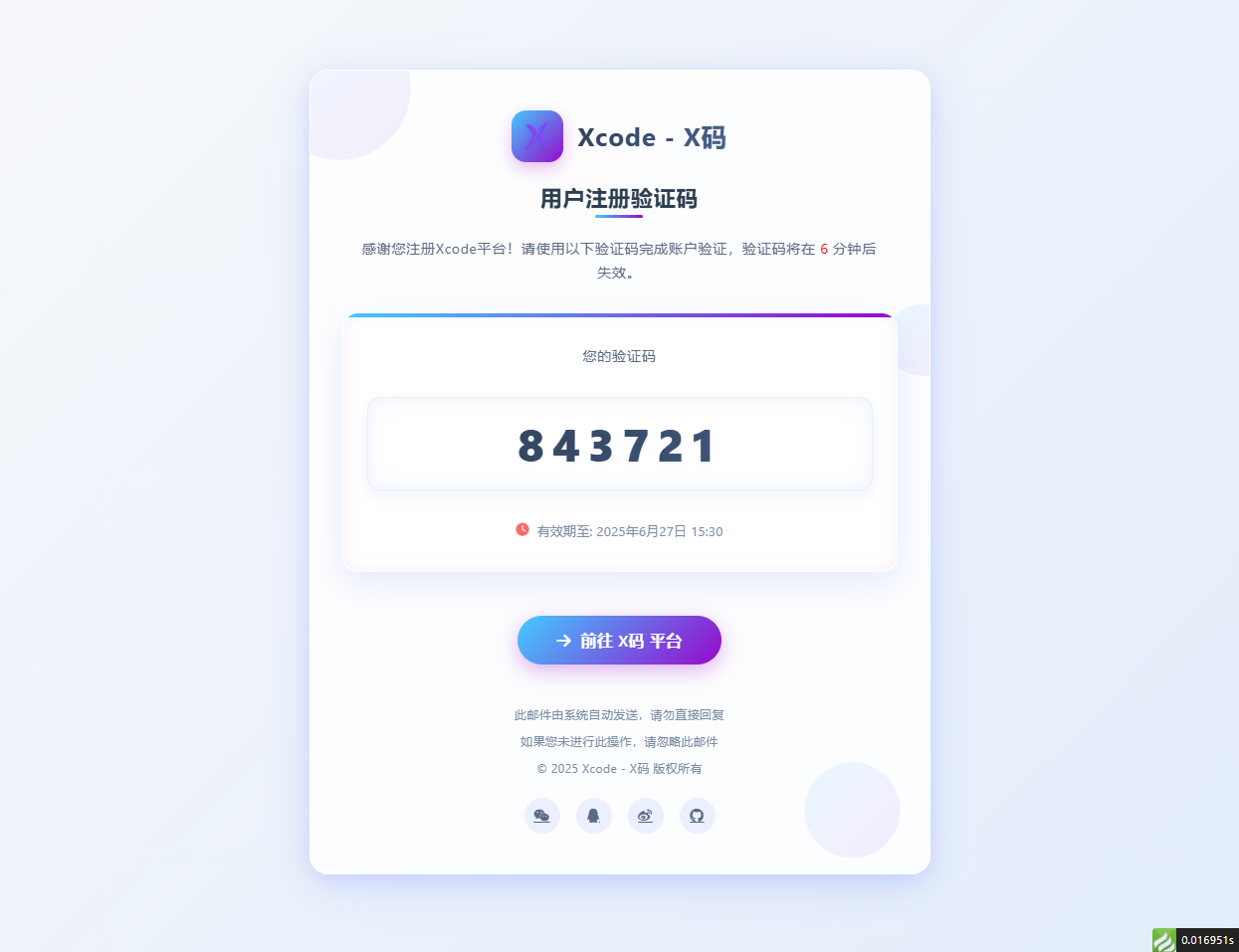
邮箱验证码html模板 适配大屏和小屏 问题:fa图标在邮件中不显示,请自行替换成图片 演示图片 大屏演示图片 代码 <!DOCTYPE html> <html lang="zh-CN"> <head> <meta charset="UTF-8"> <meta name="viewport" content="width=device-width, initial-scale=1.0"> <title>用户注册 - Xcode验证码</title> <link rel="stylesheet" href="https://cdnjs.cloudflare.com/ajax/libs/font-awesome/6.4.0/css/all.min.css"> <style> /* 基础样式重置 */ * { margin: 0; padding: 0; box-sizing: border-box; font-family: 'Segoe UI', 'PingFang SC', 'Microsoft YaHei', sans-serif; } body { background: linear-gradient(135deg, #f5f7fa 0%, #e4edfb 100%); min-height: 100vh; display: flex; justify-content: center; align-items: center; padding: 30px; letter-spacing: 0.5px; } /* 亮色毛玻璃效果容器 */ .glass-container { background: rgba(255, 255, 255, 0.85); backdrop-filter: blur(12px); -webkit-backdrop-filter: blur(12px); border-radius: 24px; border: 1px solid rgba(255, 255, 255, 0.8); box-shadow: 0 12px 40px rgba(98, 131, 252, 0.15), 0 4px 20px rgba(98, 131, 252, 0.08); width: 100%; max-width: 780px; overflow: hidden; padding: 50px 40px; position: relative; transition: all 0.4s ease; } .glass-container:hover { box-shadow: 0 15px 50px rgba(98, 131, 252, 0.2), 0 6px 25px rgba(98, 131, 252, 0.12); transform: translateY(-5px); } /* 装饰元素 */ .decoration { position: absolute; border-radius: 50%; background: linear-gradient(135deg, rgba(67, 203, 255, 0.15) 0%, rgba(151, 8, 204, 0.1) 100%); z-index: -1; opacity: 0.7; } .decoration-1 { width: 180px; height: 180px; top: -60px; left: -60px; animation: float 8s infinite ease-in-out; } .decoration-2 { width: 120px; height: 120px; bottom: 30px; right: 30px; animation: float 10s infinite ease-in-out; animation-delay: 1s; } .decoration-3 { width: 90px; height: 90px; top: 30%; right: -30px; animation: float 12s infinite ease-in-out; animation-delay: 2s; } @keyframes float { 0%, 100% { transform: translate(0, 0); } 25% { transform: translate(-10px, 15px); } 50% { transform: translate(5px, -10px); } 75% { transform: translate(10px, 5px); } } /* 头部样式 */ .header { text-align: center; margin-bottom: 40px; position: relative; } .logo { display: flex; justify-content: center; align-items: center; margin-bottom: 25px; } .logo-icon { width: 65px; height: 65px; background: linear-gradient(135deg, #43CBFF 0%, #9708CC 100%); border-radius: 18px; display: flex; justify-content: center; align-items: center; margin-right: 18px; box-shadow: 0 8px 20px rgba(151, 8, 204, 0.25); transition: all 0.3s ease; } .logo-icon:hover { transform: rotate(10deg) scale(1.05); } .logo-icon img { margin: 20%; width: 60%; height: 60%; filter: drop-shadow(0 2px 4px rgba(0, 0, 0, 0.1)); } .logo-text { font-size: 32px; font-weight: 700; background: linear-gradient(135deg, #2c3e50 0%, #4a6491 100%); -webkit-background-clip: text; background-clip: text; color: transparent; letter-spacing: 1.2px; } .title { font-size: 28px; font-weight: 700; color: #2c3e50; margin-bottom: 30px; position: relative; display: inline-block; } .title::after { content: ""; position: absolute; bottom: -8px; left: 50%; transform: translateX(-50%); width: 60px; height: 4px; background: linear-gradient(135deg, #43CBFF 0%, #9708CC 100%); border-radius: 2px; } .subtitle { font-size: 18px; color: #5a6a85; line-height: 1.7; margin: 0 auto; /* max-width: 600px; */ padding: 0 20px; } /* 验证码区域 - 亮色系突出 */ .verification-section { background: rgba(255, 255, 255, 0.95); border-radius: 20px; padding: 40px 30px; margin: 40px 0; text-align: center; backdrop-filter: blur(5px); -webkit-backdrop-filter: blur(5px); border: 1px solid rgba(255, 255, 255, 0.9); box-shadow: 0 10px 30px rgba(98, 131, 252, 0.1), inset 0 0 15px rgba(151, 8, 204, 0.05); position: relative; overflow: hidden; transition: all 0.3s ease; } .verification-section::before { content: ""; position: absolute; top: 0; left: 0; right: 0; height: 5px; background: linear-gradient(135deg, #43CBFF 0%, #9708CC 100%); } .verification-section:hover { transform: translateY(-5px); box-shadow: 0 15px 40px rgba(98, 131, 252, 0.15), inset 0 0 20px rgba(151, 8, 204, 0.08); } .verification-label { font-size: 18px; color: #5a6a85; margin-bottom: 20px; font-weight: 500; } .verification-code { width: 100%; font-size: 56px; font-weight: 800; letter-spacing: 10px; background: linear-gradient(135deg, #2c3e50 0%, #4a6491 100%); -webkit-background-clip: text; background-clip: text; color: transparent; padding: 20px 40px; border-radius: 16px; margin: 20px 0; display: inline-block; box-shadow: inset 0 0 25px rgba(98, 131, 252, 0.1), 0 8px 20px rgba(98, 131, 252, 0.1); border: 1px solid rgba(98, 131, 252, 0.15); text-shadow: 0 2px 4px rgba(0, 0, 0, 0.05); transition: all 0.3s ease; } .verification-code:hover { letter-spacing: 12px; box-shadow: inset 0 0 30px rgba(98, 131, 252, 0.15), 0 10px 25px rgba(98, 131, 252, 0.15); } .expiration { font-size: 16px; color: #7a8ca5; margin-top: 20px; display: flex; align-items: center; justify-content: center; gap: 10px; } .expiration i { color: #ff6b6b; } /* 操作区域 */ .action-section { text-align: center; margin-top: 50px; } .action-button { background: linear-gradient(135deg, #43CBFF 0%, #9708CC 100%); color: white; border: none; padding: 18px 50px; font-size: 20px; font-weight: 600; border-radius: 60px; cursor: pointer; transition: all 0.3s ease; box-shadow: 0 8px 25px rgba(151, 8, 204, 0.3); text-decoration: none; display: inline-flex; align-items: center; gap: 12px; position: relative; overflow: hidden; } .action-button::before { content: ""; position: absolute; top: 0; left: -100%; width: 100%; height: 100%; background: linear-gradient(90deg, transparent, rgba(255, 255, 255, 0.3), transparent); transition: 0.5s; } .action-button:hover::before { left: 100%; } .action-button:hover { transform: translateY(-5px) scale(1.05); box-shadow: 0 12px 35px rgba(151, 8, 204, 0.4); } .action-button:active { transform: translateY(0) scale(0.98); } .copyright-link { color: #7a8ca5; text-decoration: none; transition: all 0.3s ease; } .copyright-link:hover { color: #9708CC; text-decoration: underline; } /* 底部信息 */ .footer { text-align: center; margin-top: 50px; color: #7a8ca5; font-size: 15px; line-height: 1.7; } .footer p { margin-bottom: 8px; } .social-icons { display: flex; justify-content: center; gap: 20px; margin-top: 25px; } .social-icons a { width: 45px; height: 45px; border-radius: 50%; background: rgba(98, 131, 252, 0.1); display: flex; align-items: center; justify-content: center; color: #5a6a85; font-size: 18px; transition: all 0.3s ease; } .social-icons a:hover { background: linear-gradient(135deg, #43CBFF 0%, #9708CC 100%); color: white; transform: translateY(-5px); } /* 响应式设计 */ @media (max-width: 768px) { .glass-container { padding: 40px 30px; max-width: 100%; } .logo-icon { width: 55px; height: 55px; } .logo-text { font-size: 28px; } .title { font-size: 24px; } .subtitle { font-size: 16px; } .verification-section { padding: 30px 20px; } .verification-code { font-size: 42px; padding: 15px 30px; letter-spacing: 8px; } .action-button { padding: 16px 40px; font-size: 18px; } } @media (max-width: 480px) { .glass-container { padding: 30px 20px; } .logo { flex-direction: column; gap: 15px; } .logo-icon { margin-right: 0; } .logo-text { font-size: 26px; } .title { font-size: 22px; } .verification-section { padding: 25px 15px; } .verification-code { font-size: 36px; padding: 12px 20px; letter-spacing: 6px; } .action-button { padding: 14px 35px; font-size: 16px; } } </style> </head> <body> <div class="glass-container"> <!-- 装饰元素 --> <div class="decoration decoration-1"></div> <div class="decoration decoration-2"></div> <div class="decoration decoration-3"></div> <div class="header"> <div class="logo"> <div class="logo-icon"> <img src="http://xma.dev.khkj.xyz/static/images/logo.png" alt="Xcode Logo"> </div> <div class="logo-text">Xcode - X码</div> </div> <h1 class="title">用户注册验证码</h1> <p class="subtitle">感谢您注册Xcode平台!请使用以下验证码完成账户验证,验证码将在 <text style="color:red;">6</text> 分钟后失效。</p> </div> <div class="verification-section"> <div class="verification-label">您的验证码</div> <div class="verification-code">843721</div> <div class="expiration"> <i class="fas fa-clock"></i>有效期至: 2025年6月27日 15:30 </div> </div> <div class="action-section"> <a href="https://xma.run" class="action-button"> <i class="fas fa-arrow-right"></i>前往 X码 平台 </a> </div> <div class="footer"> <p>此邮件由系统自动发送,请勿直接回复</p> <p>如果您未进行此操作,请忽略此邮件</p> <p>© 2025 <a href="https://xma.run" class="copyright-link">Xcode - X码</a> 版权所有</p> <div class="social-icons"> <a href="#"><i class="fab fa-weixin"></i></a> <a href="#"><i class="fab fa-qq"></i></a> <a href="#"><i class="fab fa-weibo"></i></a> <a href="#"><i class="fab fa-github"></i></a> </div> </div> </div> <script> // 添加简单的交互效果 document.addEventListener('DOMContentLoaded', function() { const verificationCode = document.querySelector('.verification-code'); // 添加点击复制功能 verificationCode.addEventListener('click', function() { const text = this.innerText; const tempInput = document.createElement('input'); tempInput.value = text; document.body.appendChild(tempInput); tempInput.select(); document.execCommand('copy'); document.body.removeChild(tempInput); alert("复制成功"); }); }); </script> </body> </html>
-