Material Design 3(简称 M3)是 Google 推出的最新设计语言,它提供了更加动态和个性化的色彩系统,帮助开发者构建美观且一致的用户界面。kh-material-color专为 uniapp UTS 插件开发的 Material Design 3 色彩系统移植版本。支持 uniapp、uniappx。
官方 Material Design 3 色彩系统文档:https://m3.material.io/styles/color/
插件功能
在跨平台开发中,保持设计一致性是一项挑战。Uniapp 作为流行的跨端框架,结合 UTS 插件系统,为开发者提供了强大的原生扩展能力。kh-material-color 功能为将 Material Design 3 的色彩系统无缝集成到 uniapp 项目中,让你能够轻松应用 M3 的动态色彩方案,无论是浅色模式还是深色模式。
主要特性
- 完整的 M3 色彩支持:基于官方规范,提供所有核心色彩角色。
- 动态色彩生成:通过种子颜色自动生成协调的色彩方案。
- 深色/浅色模式支持:一键切换,适配不同主题需求。
- 简单易用的 API:几行代码即可集成到现有项目。
- 类型安全:使用 TypeScript 定义,提供完整的类型提示。
支持的颜色方案
kh-material-color 插件导出了 MaterialScheme 类型,包含了 Material Design 3 中的所有关键色彩角色。以下是完整的色彩映射:
export type MaterialScheme = {
    primary: string
    onPrimary: string
    primaryContainer: string
    onPrimaryContainer: string
    secondary: string
    onSecondary: string
    secondaryContainer: string
    onSecondaryContainer: string
    tertiary: string
    onTertiary: string
    tertiaryContainer: string
    onTertiaryContainer: string
    error: string
    onError: string
    errorContainer: string
    onErrorContainer: string
    background: string
    onBackground: string
    surface: string
    onSurface: string
    surfaceVariant: string
    onSurfaceVariant: string
    surfaceContainerHighest: string
    surfaceContainerHigh: string
    surfaceContainer: string
    surfaceContainerLow: string
    surfaceContainerLowest: string
    inverseSurface: string
    inverseOnSurface: string
    surfaceTint: string
    surfaceTintColor: string
    outline: string
    outlineVariant: string
}
这些色彩角色覆盖了界面中的所有元素,从主要按钮到背景、表面和轮廓,确保设计的一致性。
颜色演示
| 浅色模式 | 深色模式 |
|---|---|
 | 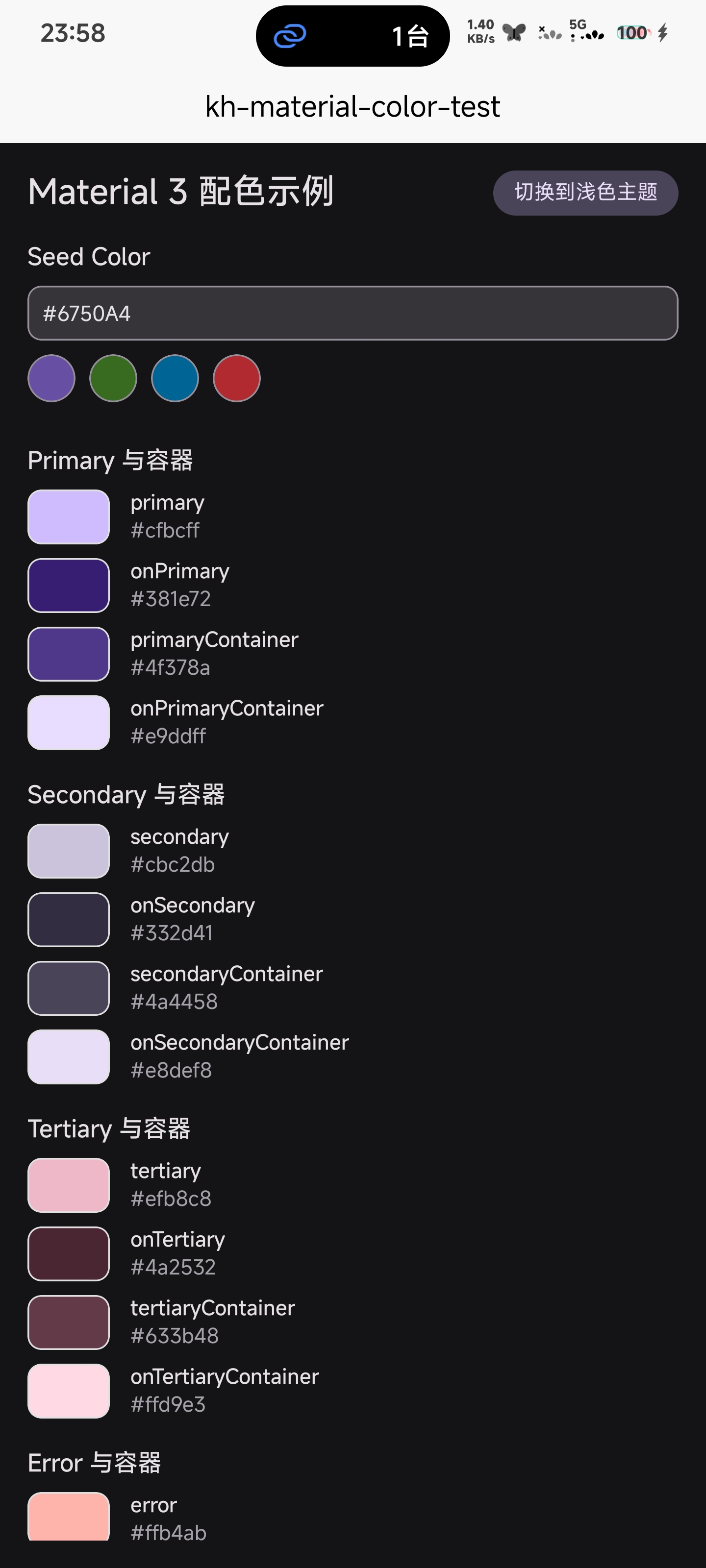 |
快速开始
步骤 1:安装插件
点击链接,进入插件市场直接导入安装。
步骤 2:引入插件
在需要使用色彩方案的页面或组件中,导入 generateMaterialScheme 函数:
import { generateMaterialScheme } from '@/uni_modules/kh-material'步骤 3:设置种子颜色和主题模式
定义种子颜色和主题模式(浅色或深色)。种子颜色是生成整个色彩方案的基础:
// 设置 Material Design 颜色方案的种子颜色
const seedColor = ref('#6750A4') // 默认 Material Design 紫色
// 是否为暗色模式
const isDark = ref(false) // 默认浅色模式
步骤 4:生成色彩方案
使用 generateMaterialScheme 函数生成色彩方案。你可以将其包装在计算属性中以实现响应式更新:
// 生成 Material Design 颜色方案
const materialScheme = generateMaterialScheme({
    seedColor: seedColor.value,
    isDark: isDark.value
})

// 或者,动态计算 Material Design 颜色方案
const scheme = computed(() => {
    return generateMaterialScheme({
        seedColor: seedColor.value,
        isDark: isDark.value
    })
})
参数说明
| 参数 | 可空 | 说明 |
|---|---|---|
seedColor | 是 | 种子颜色,用于生成整个色彩方案。默认值为 #6750A4(Material Design 标准紫色)。 |
isDark | 是 | 是否为暗色模式。默认值为 false(浅色模式)。 |
步骤 5:在模板中使用色彩方案
在模板中,你可以直接通过点操作符或下标访问色彩角色:
<template>
    <view class="container">
        <!-- 使用点操作符访问 -->
        <view
            class="surface-box"
            :style="{ backgroundColor: scheme.surface }"
        >
            <text :style="{ color: scheme.onSurface }">
                这是一个表面容器
            </text>
        </view>

        <!-- 或者使用下标访问 -->
        <view
            class="primary-box"
            :style="{ backgroundColor: scheme['primaryContainer'] }"
        >
            <text :style="{ color: scheme['onPrimaryContainer'] }">
                主要内容
            </text>
        </view>

        <!-- 动态切换深色/浅色模式示例 -->
        <button @click="toggleTheme">切换主题</button>
    </view>
</template>
脚本部分:
<script setup>
import { ref, computed } from 'vue'
import { generateMaterialScheme } from '@/uni_modules/kh-material'

const seedColor = ref('#6750A4')
const isDark = ref(false)

const scheme = computed(() => {
    return generateMaterialScheme({
        seedColor: seedColor.value,
        isDark: isDark.value
    })
})

const toggleTheme = () => {
    isDark.value = !isDark.value
}
</script>
总结
kh-material-color 插件为 uniapp/uniappx 开发者提供了一个强大而灵活的工具,以遵循 Material Design 3 规范的方式管理应用色彩。通过简单的 API,你可以快速生成动态色彩方案,并轻松适应深色和浅色模式。
无论你是构建全新的应用,还是希望将现有项目升级到 Material Design 3,这个插件都能节省大量时间,并确保设计的一致性。
如果你有任何问题或反馈,欢迎在博客或插件市场留言。
支持与赞赏
如果你觉得本插件解决了你的问题,可以考虑支持作者:
| 支付宝赞助 | 微信赞助 |
|---|---|
 |  |

插件提供的动态色彩生成功能非常实用,可以帮助开发者快速适应深色和浅色模式。