找到
3
篇与
uniapp
相关的结果
-
 UTS编写字符串编解码/加密插件(安卓及鸿蒙端) 全局说明 编写说明 uts在安卓端编译为kotlin,所以,使用可以使用安卓自带库+kotlin的方法来实现 uts在鸿蒙端编译为ArkTs,ArkTs和UTS很相似,包括一些方法都一样,所以可以直接从ArkTs的文档里复制代码,稍微修改即可使用。 使用的库 安卓端 import MessageDigest from 'java.security.MessageDigest'; import BigInteger from 'java.math.BigInteger'; import Base64 from 'java.util.Base64'; 鸿蒙端 import util from '@ohos.util'; import { cryptoFramework } from '@kit.CryptoArchitectureKit';插件接口定义 /** * interface.uts * uts插件接口定义文件,按规范定义接口文件可以在HBuilderX中更好的做到语法提示 */ /** * 哈希算法枚举 */ export type HashAlgorithm = | "MD5" | "SHA1" | "SHA224" | "SHA256" | "SHA384" | "SHA512" /** * 哈希加密返回结果 */ export type HashResult = { hash: string } /** * 哈希加密函数定义 */ export type HashFunction = (input: string, algorithm: HashAlgorithm) => string1. Base64编解码 安卓端 /** * BASE64编码方法 * * @param input 输入字符串 * @return BASE64加密后的字符串 */ export const Base64Encode = function (input: string) : string { try { // 将字符串转换为字节数组 // toByteArray()为kotlin的方法 const inputBytes = input.toByteArray(); // 使用Base64编码器进行编码 const encodedBytes = Base64.getEncoder().encodeToString(inputBytes); // 将编码后的字节数组转换为字符串 return encodedBytes; } catch (e) { console.error("BASE64加密错误:", e); return ""; } } /** * BASE64解码方法 * * @param input 输入字符串 * @return BASE64解密后的字符串 */ export const Base64Decode = function (input: string) : string { try { // 将Base64字符串转换为字节数组 const decodedBytes = Base64.getDecoder().decode(input); // 将Java字节数组转换为UTS字符串 return new String(decodedBytes); } catch (e) { console.error("BASE64解密错误:", e); return ""; } } 鸿蒙端 /** * BASE64编码方法 * * @param input 输入字符串 * @return BASE64加密后的字符串 */ export const Base64Encode = function (input: string) : string { let textEncoder = new util.TextEncoder("utf-8"); let uint8Array = textEncoder.encodeInto(input); let base64Helper = new util.Base64Helper(); return base64Helper.encodeToStringSync(uint8Array); } /** * BASE64解码方法 * * @param input 输入字符串 * @return BASE64解密后的字符串 */ export const Base64Decode = function (input: string) : string { let Base64Helper = new util.Base64Helper(); let arr = Base64Helper.decodeSync(input) let textDecoder = util.TextDecoder.create('utf-8'); return textDecoder.decodeToString(arr); } 消息摘要计算 HASH加密使用统一方法,包含MD5、SHA1、SHA224、SHA256、SHA384、SHA512 安卓端 /** * 统一哈希加密方法 * * @param input 输入字符串 * @param algorithm 哈希算法枚举 * @return 哈希加密后的十六进制字符串 */ export const hash : HashFunction = function (input : string, algorithm: HashAlgorithm) : string { try { // 创建MessageDigest实例 const md = MessageDigest.getInstance(algorithm); // 输入数据转化为字节数组 const dataArray = input.toByteArray() // 计算哈希值 const hashBytes = md.digest(dataArray); // 转换为十六进制字符串 const result = BigInteger(1, hashBytes).toString(16) return result; } catch (e) { // 方法出错时返回空字符串 console.error(`${algorithm}加密错误:`, e); return ""; } }鸿蒙端 /** * 统一哈希加密方法 * * @param input 输入字符串 * @param algorithm 哈希算法枚举 * @return 哈希加密后的十六进制字符串 */ export const hash : HashFunction = function (input : string, algorithm: HashAlgorithm) : string { try { // 创建哈希实例 let md = cryptoFramework.createMd(algorithm); // 使用同步方法更新数据 let textEncoder = util.TextEncoder.create('utf-8'); let dataBlob : cryptoFramework.DataBlob = { data: textEncoder.encodeInto(input); }; md.updateSync(dataBlob); // 使用同步方法计算摘要 let mdResult : cryptoFramework.DataBlob = md.digestSync(); // 转换为十六进制字符串 let result = Array.from(mdResult.data).map(byte => byte.toString(16).padStart(2, '0')).join(''); return result; } catch (e) { // 方法出错时返回空字符串 // console.error(`${algorithm}加密错误:`, e); return ""; } }规范调用方法 这里安卓端和鸿蒙端相同 // MD5加密 export const MD5 = function (input: string) : string { return hash(input, 'MD5') } // SHA1加密 export const SHA1 = function (input: string) : string { return hash(input, 'SHA1') } // SHA224加密 export const SHA224 = function (input: string) : string { return hash(input, 'SHA224') } // SHA256加密 export const SHA256 = function (input: string) : string { return hash(input, 'SHA256') } // SHA384加密 export const SHA384 = function (input: string) : string { return hash(input, 'SHA384') } // SHA512加密 export const SHA512 = function (input: string) : string { return hash(input, 'SHA512') }使用方法 import * as KhCrypto from '@/uni_modules/kh-crypto' const input = ref<string>('待加密字符串'); const output = ref<string>('') // base64编码 output.value = KhCrypto.Base64Encode(inputText.value) // base64解码 output.value = KhCrypto.Base64Decode(inputText.value) // MD5加密 output.value = KhCrypto.MD5(inputText.value) // SHA1加密 output.value = KhCrypto.SHA1(inputText.value) // SHA224加密 output.value = KhCrypto.SHA224(inputText.value) // SHA256加密 output.value = KhCrypto.SHA256(inputText.value) // SHA384加密 output.value = KhCrypto.SHA384(inputText.value) // SHA512加密 output.value = KhCrypto.SHA512(inputText.value)插件源码 kh-crypto - DCloud插件市场 参考文档 在uts中如何将字符串转换为ByteArray Base64Helper - 鸿蒙开发API参考 消息摘要计算介绍及算法规格 - 鸿蒙开发指南
-
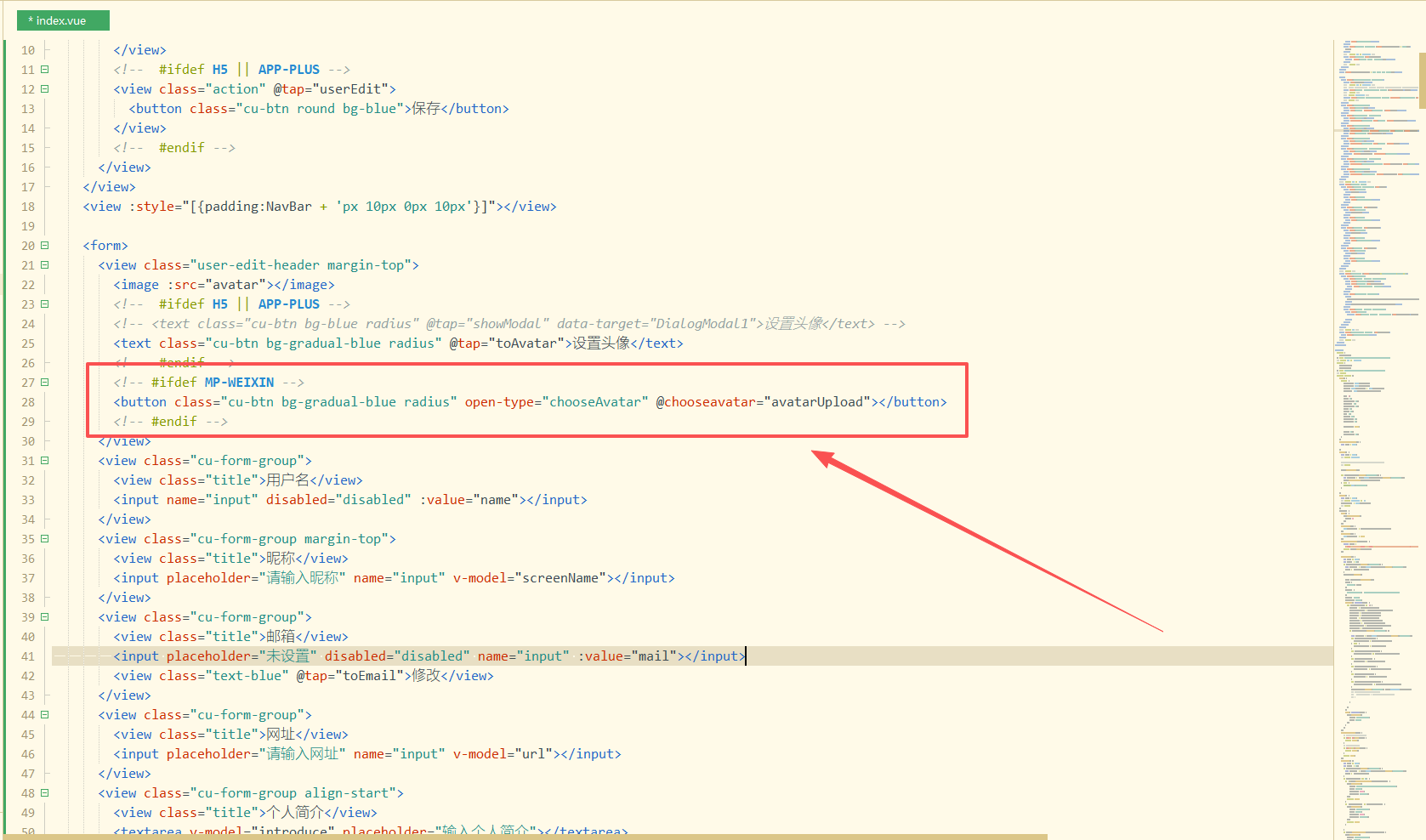
修复RuleApp在微信环境不能设置头像问题 问题说明: 问题:RuleApp在微信内无法获取用户头像,且用户无法设置 产生原因:微信修改用户信息获取规则 修复方法: 新增微信环境设置头像按钮 <!-- #ifdef MP-WEIXIN --> <button class="cu-btn bg-gradual-blue radius" open-type="chooseAvatar" @chooseavatar="avatarUpload"></button> <!-- #endif -->修改演示图片 修改avatarUpload函数,并新增uploadAvatarToSever函数 uploadAvatarToSever(path) { const uploadTask = uni.uploadFile({ url: that.$API.upload(), filePath: path, // header: { // "Content-Type": "multipart/form-data", // }, name: 'file', formData: { 'token': token }, success: function(uploadFileRes) { setTimeout(function() { uni.hideLoading(); }, 1000); var data = JSON.parse(uploadFileRes.data); //var data = uploadFileRes.data; if (data.code == 1) { // uni.showToast({ // title: data.msg, // icon: 'none' // }) that.avatar = data.data.url; that.avatarNew = data.data.url; localStorage.removeItem('toAvatar'); that.userEdit(); //console.log(that.avatar) } else { uni.showToast({ title: "头像上传失败,请检查接口", icon: 'none' }) } }, fail: function() { setTimeout(function() { uni.hideLoading(); }, 1000); } }) }, avatarUpload(data) { var that = this; var token = ""; if (localStorage.getItem('userinfo')) { var userInfo = JSON.parse(localStorage.getItem('userinfo')); token = userInfo.token; token = userInfo.token; } // #ifdef APP-PLUS || H5 base64ToPath(data) .then(path => { that.uploadAvatarToSever(path) }) .catch(error => { console.error("失败" + error) }) // #endif // #ifdef MP-WEIXIN const path = data.detail.avatarUrl that.uploadAvatarToSever(path) // #endif },修复结果: 修复后,在微信内编辑用户信息页面会有设置头像按钮,点击按钮会调用微信官方获取头像接口,选择微信头像或者设置其他头像接口,返回用户选择的头像临时路径,使用data.detail.avatarUrl获取临时路径,调用uploadAvatarToSever函数上传到服务器。 完整代码: GitHub - RuleApp(KongHen) 原项目地址: GitHub - RuleApp(buxia97)
-