找到
9
篇与
key
相关的结果
- 第 2 页
-
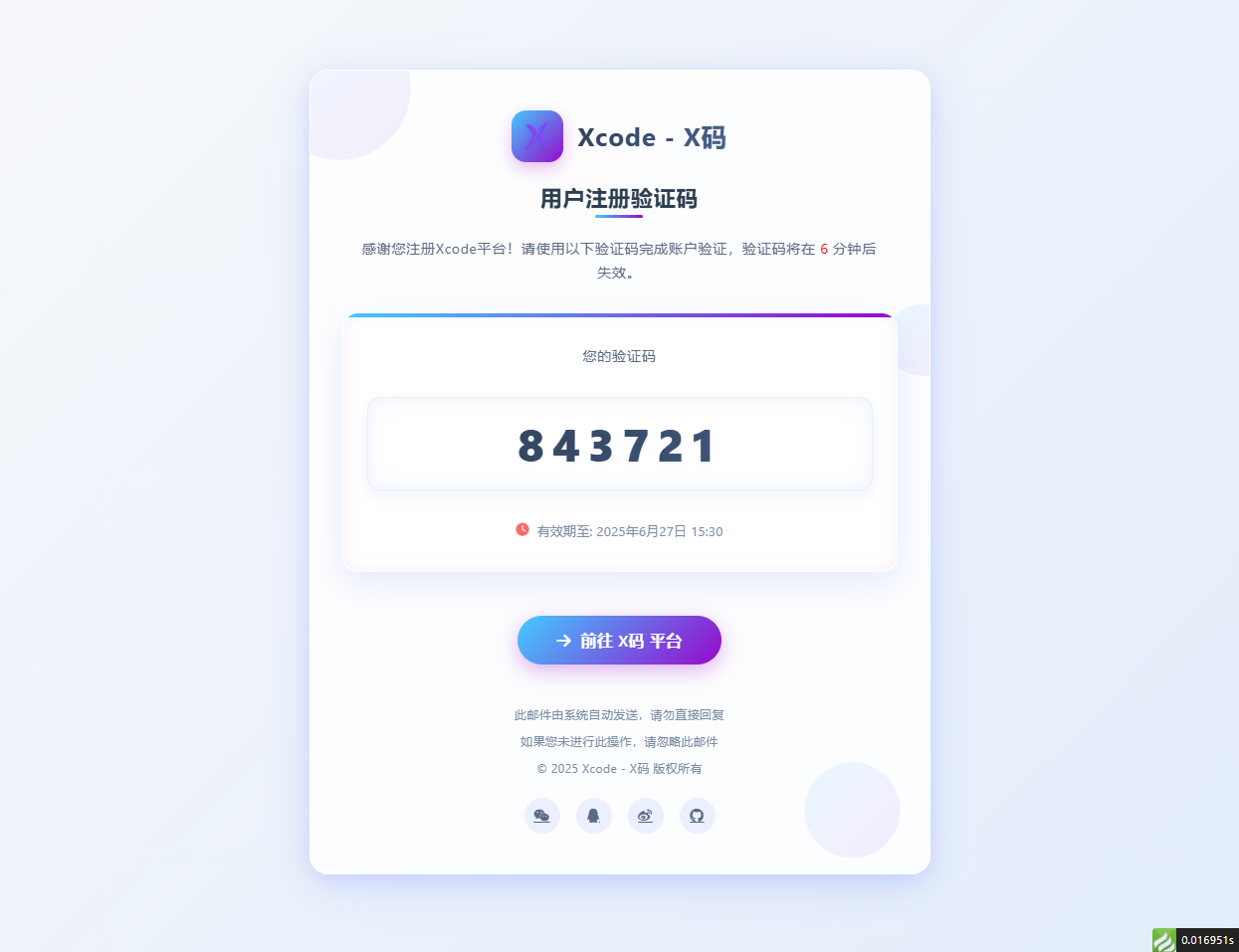
 邮箱验证码html模板 适配大屏和小屏 问题:fa图标在邮件中不显示,请自行替换成图片 演示图片 大屏演示图片 代码 <!DOCTYPE html> <html lang="zh-CN"> <head> <meta charset="UTF-8"> <meta name="viewport" content="width=device-width, initial-scale=1.0"> <title>用户注册 - Xcode验证码</title> <link rel="stylesheet" href="https://cdnjs.cloudflare.com/ajax/libs/font-awesome/6.4.0/css/all.min.css"> <style> /* 基础样式重置 */ * { margin: 0; padding: 0; box-sizing: border-box; font-family: 'Segoe UI', 'PingFang SC', 'Microsoft YaHei', sans-serif; } body { background: linear-gradient(135deg, #f5f7fa 0%, #e4edfb 100%); min-height: 100vh; display: flex; justify-content: center; align-items: center; padding: 30px; letter-spacing: 0.5px; } /* 亮色毛玻璃效果容器 */ .glass-container { background: rgba(255, 255, 255, 0.85); backdrop-filter: blur(12px); -webkit-backdrop-filter: blur(12px); border-radius: 24px; border: 1px solid rgba(255, 255, 255, 0.8); box-shadow: 0 12px 40px rgba(98, 131, 252, 0.15), 0 4px 20px rgba(98, 131, 252, 0.08); width: 100%; max-width: 780px; overflow: hidden; padding: 50px 40px; position: relative; transition: all 0.4s ease; } .glass-container:hover { box-shadow: 0 15px 50px rgba(98, 131, 252, 0.2), 0 6px 25px rgba(98, 131, 252, 0.12); transform: translateY(-5px); } /* 装饰元素 */ .decoration { position: absolute; border-radius: 50%; background: linear-gradient(135deg, rgba(67, 203, 255, 0.15) 0%, rgba(151, 8, 204, 0.1) 100%); z-index: -1; opacity: 0.7; } .decoration-1 { width: 180px; height: 180px; top: -60px; left: -60px; animation: float 8s infinite ease-in-out; } .decoration-2 { width: 120px; height: 120px; bottom: 30px; right: 30px; animation: float 10s infinite ease-in-out; animation-delay: 1s; } .decoration-3 { width: 90px; height: 90px; top: 30%; right: -30px; animation: float 12s infinite ease-in-out; animation-delay: 2s; } @keyframes float { 0%, 100% { transform: translate(0, 0); } 25% { transform: translate(-10px, 15px); } 50% { transform: translate(5px, -10px); } 75% { transform: translate(10px, 5px); } } /* 头部样式 */ .header { text-align: center; margin-bottom: 40px; position: relative; } .logo { display: flex; justify-content: center; align-items: center; margin-bottom: 25px; } .logo-icon { width: 65px; height: 65px; background: linear-gradient(135deg, #43CBFF 0%, #9708CC 100%); border-radius: 18px; display: flex; justify-content: center; align-items: center; margin-right: 18px; box-shadow: 0 8px 20px rgba(151, 8, 204, 0.25); transition: all 0.3s ease; } .logo-icon:hover { transform: rotate(10deg) scale(1.05); } .logo-icon img { margin: 20%; width: 60%; height: 60%; filter: drop-shadow(0 2px 4px rgba(0, 0, 0, 0.1)); } .logo-text { font-size: 32px; font-weight: 700; background: linear-gradient(135deg, #2c3e50 0%, #4a6491 100%); -webkit-background-clip: text; background-clip: text; color: transparent; letter-spacing: 1.2px; } .title { font-size: 28px; font-weight: 700; color: #2c3e50; margin-bottom: 30px; position: relative; display: inline-block; } .title::after { content: ""; position: absolute; bottom: -8px; left: 50%; transform: translateX(-50%); width: 60px; height: 4px; background: linear-gradient(135deg, #43CBFF 0%, #9708CC 100%); border-radius: 2px; } .subtitle { font-size: 18px; color: #5a6a85; line-height: 1.7; margin: 0 auto; /* max-width: 600px; */ padding: 0 20px; } /* 验证码区域 - 亮色系突出 */ .verification-section { background: rgba(255, 255, 255, 0.95); border-radius: 20px; padding: 40px 30px; margin: 40px 0; text-align: center; backdrop-filter: blur(5px); -webkit-backdrop-filter: blur(5px); border: 1px solid rgba(255, 255, 255, 0.9); box-shadow: 0 10px 30px rgba(98, 131, 252, 0.1), inset 0 0 15px rgba(151, 8, 204, 0.05); position: relative; overflow: hidden; transition: all 0.3s ease; } .verification-section::before { content: ""; position: absolute; top: 0; left: 0; right: 0; height: 5px; background: linear-gradient(135deg, #43CBFF 0%, #9708CC 100%); } .verification-section:hover { transform: translateY(-5px); box-shadow: 0 15px 40px rgba(98, 131, 252, 0.15), inset 0 0 20px rgba(151, 8, 204, 0.08); } .verification-label { font-size: 18px; color: #5a6a85; margin-bottom: 20px; font-weight: 500; } .verification-code { width: 100%; font-size: 56px; font-weight: 800; letter-spacing: 10px; background: linear-gradient(135deg, #2c3e50 0%, #4a6491 100%); -webkit-background-clip: text; background-clip: text; color: transparent; padding: 20px 40px; border-radius: 16px; margin: 20px 0; display: inline-block; box-shadow: inset 0 0 25px rgba(98, 131, 252, 0.1), 0 8px 20px rgba(98, 131, 252, 0.1); border: 1px solid rgba(98, 131, 252, 0.15); text-shadow: 0 2px 4px rgba(0, 0, 0, 0.05); transition: all 0.3s ease; } .verification-code:hover { letter-spacing: 12px; box-shadow: inset 0 0 30px rgba(98, 131, 252, 0.15), 0 10px 25px rgba(98, 131, 252, 0.15); } .expiration { font-size: 16px; color: #7a8ca5; margin-top: 20px; display: flex; align-items: center; justify-content: center; gap: 10px; } .expiration i { color: #ff6b6b; } /* 操作区域 */ .action-section { text-align: center; margin-top: 50px; } .action-button { background: linear-gradient(135deg, #43CBFF 0%, #9708CC 100%); color: white; border: none; padding: 18px 50px; font-size: 20px; font-weight: 600; border-radius: 60px; cursor: pointer; transition: all 0.3s ease; box-shadow: 0 8px 25px rgba(151, 8, 204, 0.3); text-decoration: none; display: inline-flex; align-items: center; gap: 12px; position: relative; overflow: hidden; } .action-button::before { content: ""; position: absolute; top: 0; left: -100%; width: 100%; height: 100%; background: linear-gradient(90deg, transparent, rgba(255, 255, 255, 0.3), transparent); transition: 0.5s; } .action-button:hover::before { left: 100%; } .action-button:hover { transform: translateY(-5px) scale(1.05); box-shadow: 0 12px 35px rgba(151, 8, 204, 0.4); } .action-button:active { transform: translateY(0) scale(0.98); } .copyright-link { color: #7a8ca5; text-decoration: none; transition: all 0.3s ease; } .copyright-link:hover { color: #9708CC; text-decoration: underline; } /* 底部信息 */ .footer { text-align: center; margin-top: 50px; color: #7a8ca5; font-size: 15px; line-height: 1.7; } .footer p { margin-bottom: 8px; } .social-icons { display: flex; justify-content: center; gap: 20px; margin-top: 25px; } .social-icons a { width: 45px; height: 45px; border-radius: 50%; background: rgba(98, 131, 252, 0.1); display: flex; align-items: center; justify-content: center; color: #5a6a85; font-size: 18px; transition: all 0.3s ease; } .social-icons a:hover { background: linear-gradient(135deg, #43CBFF 0%, #9708CC 100%); color: white; transform: translateY(-5px); } /* 响应式设计 */ @media (max-width: 768px) { .glass-container { padding: 40px 30px; max-width: 100%; } .logo-icon { width: 55px; height: 55px; } .logo-text { font-size: 28px; } .title { font-size: 24px; } .subtitle { font-size: 16px; } .verification-section { padding: 30px 20px; } .verification-code { font-size: 42px; padding: 15px 30px; letter-spacing: 8px; } .action-button { padding: 16px 40px; font-size: 18px; } } @media (max-width: 480px) { .glass-container { padding: 30px 20px; } .logo { flex-direction: column; gap: 15px; } .logo-icon { margin-right: 0; } .logo-text { font-size: 26px; } .title { font-size: 22px; } .verification-section { padding: 25px 15px; } .verification-code { font-size: 36px; padding: 12px 20px; letter-spacing: 6px; } .action-button { padding: 14px 35px; font-size: 16px; } } </style> </head> <body> <div class="glass-container"> <!-- 装饰元素 --> <div class="decoration decoration-1"></div> <div class="decoration decoration-2"></div> <div class="decoration decoration-3"></div> <div class="header"> <div class="logo"> <div class="logo-icon"> <img src="http://xma.dev.khkj.xyz/static/images/logo.png" alt="Xcode Logo"> </div> <div class="logo-text">Xcode - X码</div> </div> <h1 class="title">用户注册验证码</h1> <p class="subtitle">感谢您注册Xcode平台!请使用以下验证码完成账户验证,验证码将在 <text style="color:red;">6</text> 分钟后失效。</p> </div> <div class="verification-section"> <div class="verification-label">您的验证码</div> <div class="verification-code">843721</div> <div class="expiration"> <i class="fas fa-clock"></i>有效期至: 2025年6月27日 15:30 </div> </div> <div class="action-section"> <a href="https://xma.run" class="action-button"> <i class="fas fa-arrow-right"></i>前往 X码 平台 </a> </div> <div class="footer"> <p>此邮件由系统自动发送,请勿直接回复</p> <p>如果您未进行此操作,请忽略此邮件</p> <p>© 2025 <a href="https://xma.run" class="copyright-link">Xcode - X码</a> 版权所有</p> <div class="social-icons"> <a href="#"><i class="fab fa-weixin"></i></a> <a href="#"><i class="fab fa-qq"></i></a> <a href="#"><i class="fab fa-weibo"></i></a> <a href="#"><i class="fab fa-github"></i></a> </div> </div> </div> <script> // 添加简单的交互效果 document.addEventListener('DOMContentLoaded', function() { const verificationCode = document.querySelector('.verification-code'); // 添加点击复制功能 verificationCode.addEventListener('click', function() { const text = this.innerText; const tempInput = document.createElement('input'); tempInput.value = text; document.body.appendChild(tempInput); tempInput.select(); document.execCommand('copy'); document.body.removeChild(tempInput); alert("复制成功"); }); }); </script> </body> </html>
-
php利用redis实现接口数据缓存 php利用redis实现服务端数据缓存。 要求php版本大于8.0 缓存类 文件RedisCache.php <?php /** * 请求缓存类 * 利用redis实现数据缓存 * * 作者:KongHen02 * */ class RedisCache { private string $key; private Redis $redis; public function __construct(int $db = 0, bool $device = false) { $config = [ 'host' => '127.0.0.1', 'port' => 6379, 'timeout' => 2, 'database' => $db ]; try { $this->redis = new Redis(); $this->redis->connect( $config['host'], $config['port'], $config['timeout'] ); $this->redis->select($config['database']); } catch (RedisException $e) { error_log("Redis连接失败: " . $e->getMessage()); throw new RuntimeException("缓存服务不可用"); } $this->key = $this->generateKey($device); } public function getCache(): mixed { try { header('X-Cache: ' . ($this->redis->exists($this->key) ? 'HIT' : 'MISS')); $data = $this->redis->get($this->key); return $data !== false ? unserialize($data) : null; } catch (RedisException $e) { error_log("读取缓存数据失败: " . $e->getMessage()); return null; } } public function setCache(mixed $data, int $ttl = 7200): bool { try { return $this->redis->setex( $this->key, $ttl, serialize($data) ); } catch (RedisException $e) { error_log("写入缓存数据失败: " . $e->getMessage()); return false; } } public function __destruct() { try { $this->redis?->close(); } catch (RedisException $e) { error_log("关闭Redis连接失败: " . $e->getMessage()); } } private function generateKey(bool $device): string { $url = $_SERVER['HTTP_HOST']; $urlArray = explode("?", $_SERVER['REQUEST_URI']); $url .= $urlArray[0]; $params = $_POST; ksort($params); $keyParts = [ $_SERVER['REQUEST_METHOD'], $device ? $this->detectDevice() : null, $url, substr(md5($urlArray[1]), 0, 8), substr(md5(http_build_query($params)), 0, 8) ]; return implode(':', array_filter($keyParts)); } private function detectDevice(): string { $ua = strtolower($_SERVER['HTTP_USER_AGENT'] ?? ''); return match(true) { (bool)preg_match('/mobile|android|iphone|ipod|windows phone/', $ua) => 'mobile', (bool)preg_match('/tablet|ipad|kindle/', $ua) => 'tablet', default => 'desktop' }; } } ?>使用说明 <?php // 导入缓存类 require_once($_SERVER['DOCUMENT_ROOT'] . "/RedisCache.php"); try { // 0:redis表序;0-15;必填 // true:是否区分客户端类型(手机/平板/电脑);true/false(默认);可空 $RedisCache = new RedisCache(0, true); if (($result = $RedisCache->getCache()) !== null) { exit($result); } } catch (RuntimeException $e) { // 缓存服务不可用时继续执行 header('X-Cache-Status: Down'); } // 业务逻辑处理 $result = "数据内容,不限制类型"; // 缓存成功结果 if (isset($result)) { // $result:需要缓存的数据;mixed;必填 // 7200:数据有效期;int(默认7200);可空 $RedisCache?->setCache($result, 7200); } echo($result); ?>
-
UTS封装uni.request请求拦截器 UTS封装请求拦截器主要就是数据类型的问题 简单封装示例:每次请求在请求头中携带设备信息 export type RequestParams = { url: string; method: RequestMethod; data?: string; header?: UTSJSONObject; timeout?: number; sslVerify?: boolean; withCredentials?: boolean; firstIpv4?: boolean; } export type RequestRoot = { code: number; msg: string; data?: any } export type RequestRes = { data?: any; error?: string; } // 获取系统信息 export const getSystemInfo = (): string => { const system = uni.getSystemInfoSync() // 返回app信息,依次为appid,系统名称,系统版本,app版本,设备id,使用____分割 return system.appId + "____" + system.osName + "____" + system.osVersion + "____" + system.appVersionCode + "____" + system.deviceId } // 发送请求并携带设备信息 export const sendRequest = (options: RequestParams): Promise<RequestRes> => { let info = getSystemInfo(); let header = {} if (options.header != null) { header = UTSJSONObject.assign(options.header as UTSJSONObject, { app: info }) }else { header = UTSJSONObject.assign(header, { app: info }) } // 返回一个Promise return new Promise((resolve, reject) => { uni.request<RequestRoot>({ // ...options, // 展开其他请求配置 url: options.url, method: options.method, data: options.data ?? "", header: header, timeout: options.timeout ?? 6000, sslVerify: options.sslVerify ?? true, withCredentials: options.withCredentials ?? false, firstIpv4: options.firstIpv4 ?? false, success: (res) => { const data = res.data as RequestRoot if(data.code == 200) { // 在请求成功时解析Promise resolve({ data: data.data } as RequestRes) }else { uni.showToast({ title: data.msg, icon: "error" }) reject({ error: data['msg'] as string } as RequestRes) } }, fail: (err) => { uni.showToast({ title: err.errMsg, icon: "error" }) // 在请求失败时拒绝Promise reject({ error: err.errMsg as string } as RequestRes) } } as RequestOptions<any>); }); } 使用示例 // 导入封装的函数 import { sendRequest } from "@/common/request.uts" // 定义存储的变量 // 1. 数组 const list = ref<UTSJSONObject[]>([]) // 2. 对象 // const list = ref<UTSJSONObject>({}) // 请求示例:使用Promise的方式调用sendRequest函数 sendRequest({ url: 'https://api.example.com/data', method: 'GET' }).then(res => { // 处理请求成功的结果 list.value = res.data as UTSJSONObject[] // 数组,对应的存储数组的变量 // list.value = res.data as UTSJSONObject // 对象,对应的存储对象的变量 console.log('处理结果:', data.value); }).catch(err => { // 处理请求失败的情况 console.error('请求失败:', err); }) 在模板中使用示例 注意使用变量中数据的方法只能为下标[""]方法,.操作符不可以,会报错 <view v-for="item in noticeList" :key="item['id']"> <image mode="widthFix" :src="item['image']"></image> <view> <text>{{ item['title'] }}</text> <text>{{ item['sort'] }}</text> </view> </view>说明: 因为书写习惯原因,我自己的所有后端返回数据均为json,返回对象参数如下 参数描述示例code错误码200: 成功, 400: 失败, 或其他msg请求结果说明请求成功/请求失败等data请求返回的结果json数组/对象示例如下: data为数组 { code: 200, msg: "请求成功", data: [] } data为对象 { code: 200, msg: "请求成功", data: {} } 对应封装的请求中的自定义类型RootRes(request.uts文件中)
-
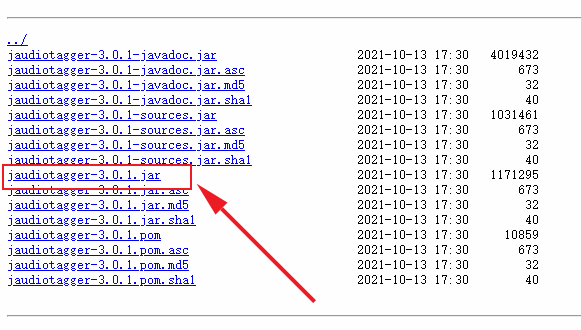
UTS引用原生jar包进行原生插件开发 也是踩了很多坑。主要的坑有两个,一个是引入jar包的问题,另一个就是jar包的使用问题(这个还得看包的文档 :@(吐血倒地) ) 下载jar包 我要用的是jaudiotagger包,引来实现对音乐标签信息的修改,包下载地址:https://central.sonatype.com/artifact/net.jthink/jaudiotagger/versions 我用的是最新的3.0.1版本,下载图中这个 lvkwkzpv.png图片 创建插件 下面是步骤: 创建插件参考官方教程步骤,这个很详细 地址: https://doc.dcloud.net.cn/uni-app-x/plugin/uts-plugin.html#%E5%88%9B%E5%BB%BAuts%E6%8F%92%E4%BB%B6 引入jar包 将你下载的jar包移动到libs目录下,如图 lvkwqa8k.png图片 导入包中的方法 java导入的方法 import org.jaudiotagger.audio.flac.FlacFile; import org.jaudiotagger.audio.generic.AudioFile; import org.jaudiotagger.audio.generic.AudioFileIO; import org.jaudiotagger.tag.FieldKey; import org.jaudiotagger.tag.Tag; import org.jaudiotagger.tag.images.Artwork;ts导入的方法 import FlacFile from "org.jaudiotagger.audio.flac.FlacFile"; import AudioFile from "org.jaudiotagger.audio.generic.AudioFile"; import AudioFileIO from "org.jaudiotagger.audio.generic.AudioFileIO"; import FieldKey from "org.jaudiotagger.tag.FieldKey"; import Tag from "org.jaudiotagger.tag.Tag"; import Artwork from "org.jaudiotagger.tag.images.Artwork";就这样导入就可以了,在Hbuilderx中,有代码提示,也可以不自己导入,写完代码,点击代码提示,又自动修复功能,当然,自动修复导入的不完全正确。 使用方法 测试的时候要打包自定义基座进行测试 使用的话,导入后就当ts方法写就行 有些报错是编译器bug不用管 // 引入java文件类 import File from "java.io.File"; import Files from "java.nio.file.Files"; // 引入jaudiotagger包 import AudioFile from "org.jaudiotagger.audio.AudioFile"; import AudioFileIO from "org.jaudiotagger.audio.AudioFileIO"; // import { Tag, FieldKey } from "org.jaudiotagger.tag"; import Tag from "org.jaudiotagger.tag.Tag"; import FieldKey from "org.jaudiotagger.tag.FieldKey"; // mp3封面相关 import StandardArtwork from "org.jaudiotagger.tag.images.StandardArtwork"; // falc封面相关 import FlacTag from "org.jaudiotagger.tag.flac.FlacTag"; import FileInputStream from "java.io.FileInputStream"; import PictureTypes from "org.jaudiotagger.tag.reference.PictureTypes"; /** * MusicInfo * 音乐信息类型 * */ type Tags = { audio: string; title: string; artist: string; album: string; cover: string; } export class KhMusicTag { /** * 私有变量 * tags { Tags } 标签信息 * action { boolean[] } 封面图片路径 * */ /** * writeMp3Tag * 写入mp3的封面图 * @param { string } cover 封面图路径 * * @returns { Boolean} 返回写入结果 */ public writeMp3Tag(info: Tags): boolean { try { // 读取音频文件 const audioFile = AudioFileIO.read(new File(info.audio)); const mp3Tag: Tag = audioFile.getTagOrCreateAndSetDefault(); // 设置歌曲名,歌手名,专辑名 mp3Tag.setField(FieldKey.TITLE, info.title); mp3Tag.setField(FieldKey.ARTIST, info.artist); mp3Tag.setField(FieldKey.ALBUM, info.album); // 创建封面图实例 const coverImage: File = new File(info.cover); // 创建Artwork对象 const artwork: StandardArtwork = new StandardArtwork(); artwork.setBinaryData(Files.readAllBytes(coverImage.toPath())); artwork.setMimeType("image/jpg"); // 根据实际封面图片类型设置 artwork.setPictureType(3); // 删除旧的封面图 mp3Tag.deleteArtworkField(); // 写入封面图 mp3Tag.setField(artwork); // 写回文件 audioFile.commit(); return true; } catch(e) { return false; } } /** * writeFlacCover * 写入flac的封面图 * @param { Tags } info 标签信息 * * @returns { Boolean} 返回写入结果 */ public writeFlacTag(info: Tags): boolean { try { // 读取flac文件,并强制申明为FlacTag类型 const audioFile = AudioFileIO.read(new File(info.audio)); const flacTag = audioFile.getTag() as FlacTag; // 设置歌曲名,歌flac手名,专辑名 flacTag.setField(FieldKey.TITLE, info.title); flacTag.setField(FieldKey.ARTIST, info.artist); flacTag.setField(FieldKey.ALBUM, info.album); // 读取封面图为字节流 const imageFile: FileInputStream = new FileInputStream(info.cover); const imagedata: ByteArray = new ByteArray(imageFile.available()); imageFile.read(imagedata); // 写入封面图 flacTag.setField(flacTag.createArtworkField(imagedata, PictureTypes.DEFAULT_ID, "image/jpg", "KHMD", 200, 200, 24, 0)); // 写回文件 audioFile.commit(); return true; } catch (e) { return false; } } }参考文献: 依据于开源的java库jaudiotagger 地址:https://bitbucket.org/ijabz/jaudiotagger/src/master/ 文档:http://jthink.net/jaudiotagger/index.jsp 成品jar包下载地址:https://central.sonatype.com/artifact/net.jthink/jaudiotagger/versions 说明:建议查看源码中的testsrc中的示例,个人觉得比文档中的示例详细和有用